> ## Documentation Index
> Fetch the complete documentation index at: https://docs.siliconflow.cn/llms.txt
> Use this file to discover all available pages before exploring further.
# Text generation
Language Model (LLM) User Manual
## 1. Model Core Capabilities
### 1.1 Basic Functions
Text Generation: Generate coherent natural language text based on context, supporting various styles and genres.
Semantic Understanding: Deeply parse user intent, supporting multi-round dialogue management to ensure the coherence and accuracy of conversations.
Knowledge Q\&A: Cover a wide range of knowledge domains, including science, technology, culture, history, etc., providing accurate knowledge answers.
Code Assistance: Support code generation, explanation, and debugging for multiple mainstream programming languages (such as Python, Java, C++, etc.).
### 1.2 Advanced Capabilities
Long Text Processing: Support context windows of 4k to 64k tokens, suitable for long document generation and complex dialogue scenarios.
Instruction Following: Precisely understand complex task instructions, such as "compare A/B schemes using a Markdown table."
Style Control: Adjust output style through system prompts, supporting various styles such as academic, conversational, and poetry.
Multimodal Support: In addition to text generation, support tasks such as image description and speech-to-text.
## 2. API Call Specifications
### 2.1 Basic Request Structure
You can make end-to-end API requests using the OpenAI SDK
```python theme={null}
from openai import OpenAI
client = OpenAI(api_key="YOUR_KEY", base_url="https://api.siliconflow.cn/v1")
response = client.chat.completions.create(
model="deepseek-ai/DeepSeek-V3",
messages=[
{"role": "system", "content": "You are a helpful assistant."},
{"role": "user", "content": "Write a haiku about recursion in programming."}
],
temperature=0.7,
max_tokens=1024,
stream=True
)
# 逐步接收并处理响应
for chunk in response:
if not chunk.choices:
continue
if chunk.choices[0].delta.content:
print(chunk.choices[0].delta.content, end="", flush=True)
if chunk.choices[0].delta.reasoning_content:
print(chunk.choices[0].delta.reasoning_content, end="", flush=True)
```
```python theme={null}
from openai import OpenAI
client = OpenAI(api_key="YOUR_KEY", base_url="https://api.siliconflow.cn/v1")
response = client.chat.completions.create(
model="deepseek-ai/deepseek-vl2",
messages=[
{
"role": "user",
"content": [
{
"type": "image_url",
"image_url": {
"url": "https://sf-maas-uat-prod.oss-cn-shanghai.aliyuncs.com/outputs/658c7434-ec12-49cc-90e6-fe22ccccaf62_00001_.png",
},
},
{
"type": "text",
"text": "What's in this image?"
}
],
}
],
temperature=0.7,
max_tokens=1024,
stream=True
)
# 逐步接收并处理响应
for chunk in response:
if not chunk.choices:
continue
if chunk.choices[0].delta.content:
print(chunk.choices[0].delta.content, end="", flush=True)
if chunk.choices[0].delta.reasoning_content:
print(chunk.choices[0].delta.reasoning_content, end="", flush=True)
```
```python theme={null}
import json
from openai import OpenAI
client = OpenAI(
api_key="您的 APIKEY", # 从https://cloud.siliconflow.cn/account/ak获取
base_url="https://api.siliconflow.cn/v1"
)
response = client.chat.completions.create(
model="deepseek-ai/DeepSeek-V2.5",
messages=[
{"role": "system", "content": "You are a helpful assistant designed to output JSON."},
{"role": "user", "content": "? 2020 年世界奥运会乒乓球男子和女子单打冠军分别是谁? "
"Please respond in the format {\"男子冠军\": ..., \"女子冠军\": ...}"}
],
response_format={"type": "json_object"}
)
print(response.choices[0].message.content)
```
### 2.2 Message Body Structure Description
| Message Type | Description | Example Content |
| ------------ | -------------------------------------------------------------------------------------------------------------------------------- | ------------------------------------------------------------------ |
| system | Model instruction, sets the AI role and describes how the model should generally behave and respond | Example: "You are a pediatrician with 10 years of experience" |
| user | User input, passes the final user's message to the model | Example: "How should I handle a child with persistent low fever?" |
| assistant | Model-generated historical responses, provides examples for the model to understand how it should respond to the current request | Example: "I would suggest first taking the child's temperature..." |
When you want the model to follow layered instructions, message roles can help you get better outputs. However, they are not deterministic, so the best approach is to try different methods and see which one gives you the desired results.
## 3. Model Series Selection Guide
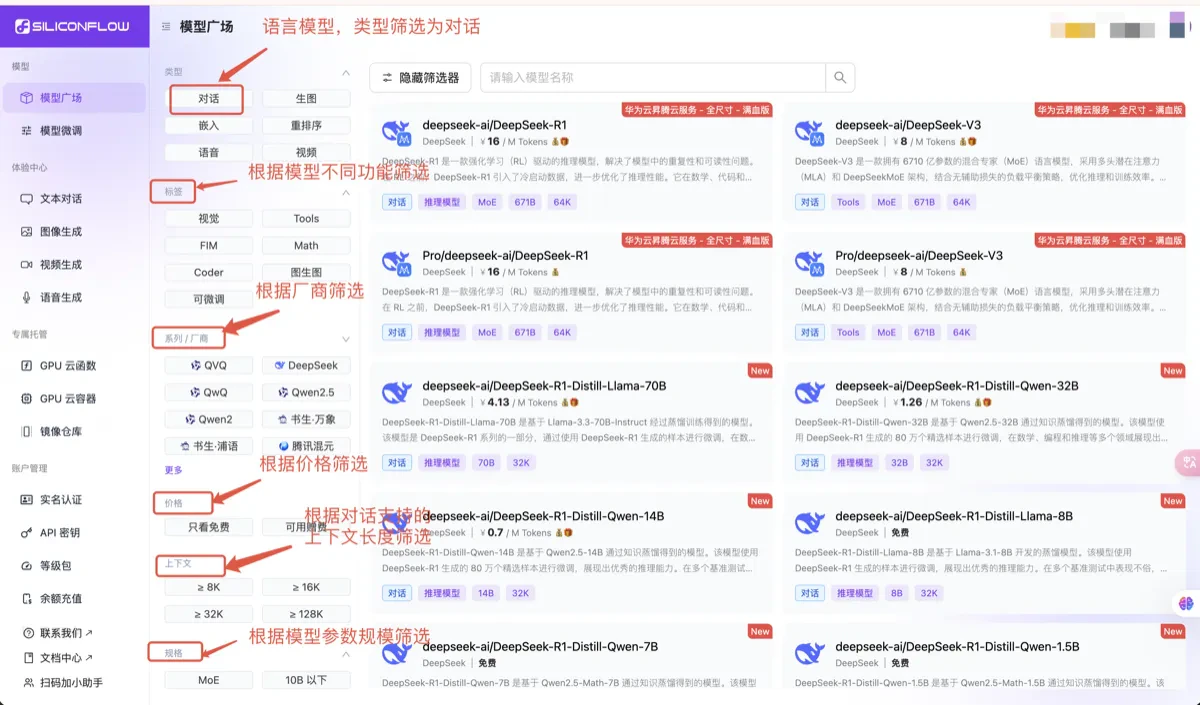
You can enter the [Models](https://cloud.siliconflow.cn/models) and filter language models that support different functionalities using the filters on the left. Based on the model descriptions, you can understand the specific pricing, model parameter size, maximum context length supported by the model, and other details.
You can experience the models in the [playground](https://cloud.siliconflow.cn/playground/chat) (the playground only provides model experience and does not have a history record function. If you want to save the conversation records, please save the session content yourself). For more usage instructions, you can refer to the [API Documentation](https://docs.siliconflow.cn/cn/api-reference/chat-completions/chat-completions).
 ## 4.Detailed Explanation of Core Parameters
### 4.1 Creativity Control
```bash theme={null}
# temperature parameter(0.0~2.0)
temperature=0.5 # Balance creativity and reliability
# top-p Sampling(top_p)
top_p=0.9 # Consider only the set of words with a cumulative probability of 90%
```
### 4.2 Output Constraints
```json theme={null}
max_tokens=1000 # Maximum length of generated text in tokens
stop=["\n##", "<|end|>"] # Stop sequences, output stops when encountering the corresponding string in the array
frequency_penalty=0.5 # Penalize repeated words (-2.0 to 2.0)
stream=true # Control whether the output is stream-based. For models with a lot of output, it is recommended to set this to true to prevent output timeouts due to excessive length
```
### 4.3 Summary of Language Model Scenarios
**1. Model Output Encoding Issues**
Currently, some models are prone to encoding issues when parameters are not set. If you encounter such issues, you can try setting the temperature, top\_k, top\_p, and frequency\_penalty parameters.
Modify the payload as follows, adjusting as needed for different languages:
```python theme={null}
payload = {
"model": "Qwen/Qwen2.5-Math-72B-Instruct",
"messages": [
{
"role": "user",
"content": "1+1=?",
}
],
"max_tokens": 200, # Adjust as needed
"temperature": 0.7, # Adjust as needed
"top_k": 50, # Adjust as needed
"top_p": 0.7, # Adjust as needed
"frequency_penalty": 0 # Adjust as needed
}
```
**2. Explanation of max\_tokens**
The max\_tokens is equal to the context length. Since some model inference services are still being updated, please do not set max\_tokens to the maximum value (context length) when making a request. It is recommended to reserve around 10k as space for input content.
**3. Explanation of context\_length**
The context\_length varies for different LLM models. You can search for the specific model on the [Models](https://cloud.siliconflow.cn/models) to view the model details.
**4. Output Truncation Issues in Model Inference**
Here are several aspects to troubleshoot the issue:
* When encountering output truncation through API requests:
* Max Tokens Setting: Set the max\_token to an appropriate value. If the output exceeds the max\_token, it will be truncated.
* Stream Request Setting: In non-stream requests, long output content is prone to 504 timeout issues.
* Client Timeout Setting: Increase the client timeout to prevent truncation before the output is fully completed.
* When encountering output truncation through third-party client requests:
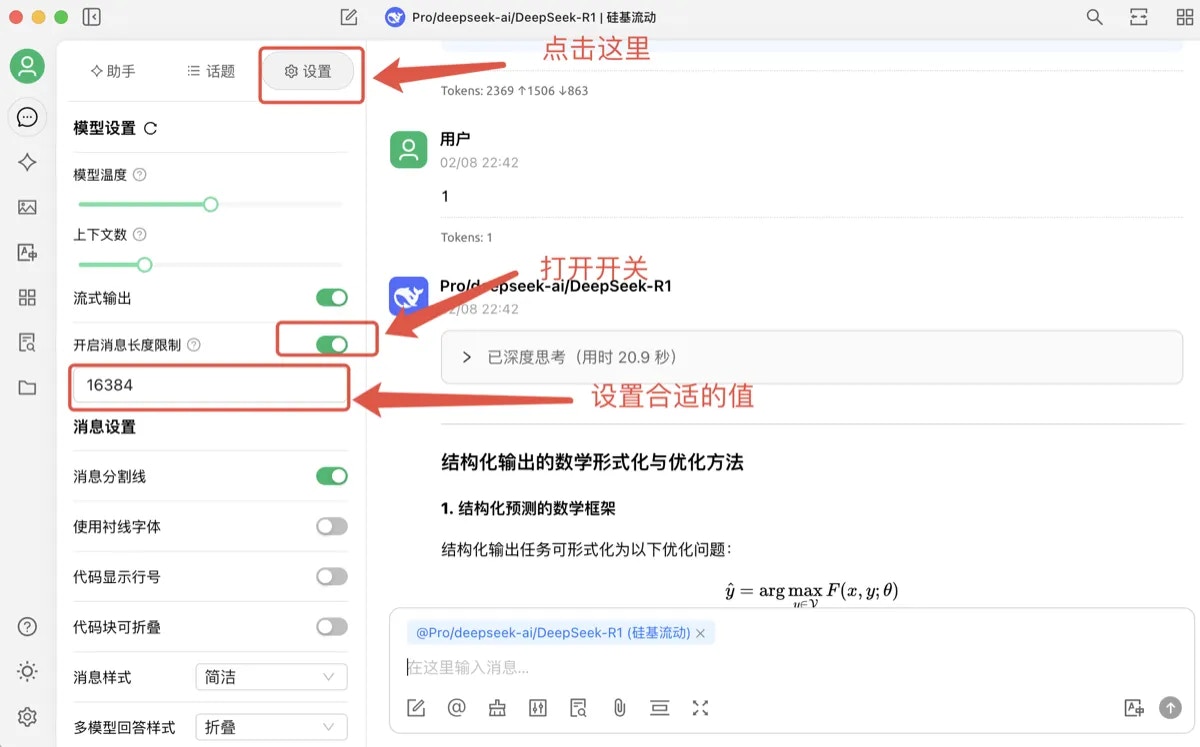
* CherryStdio has a default max\_tokens of 4,096. Users can enable the "Enable Message Length Limit" switch to set the max\_token to an appropriate value.
## 4.Detailed Explanation of Core Parameters
### 4.1 Creativity Control
```bash theme={null}
# temperature parameter(0.0~2.0)
temperature=0.5 # Balance creativity and reliability
# top-p Sampling(top_p)
top_p=0.9 # Consider only the set of words with a cumulative probability of 90%
```
### 4.2 Output Constraints
```json theme={null}
max_tokens=1000 # Maximum length of generated text in tokens
stop=["\n##", "<|end|>"] # Stop sequences, output stops when encountering the corresponding string in the array
frequency_penalty=0.5 # Penalize repeated words (-2.0 to 2.0)
stream=true # Control whether the output is stream-based. For models with a lot of output, it is recommended to set this to true to prevent output timeouts due to excessive length
```
### 4.3 Summary of Language Model Scenarios
**1. Model Output Encoding Issues**
Currently, some models are prone to encoding issues when parameters are not set. If you encounter such issues, you can try setting the temperature, top\_k, top\_p, and frequency\_penalty parameters.
Modify the payload as follows, adjusting as needed for different languages:
```python theme={null}
payload = {
"model": "Qwen/Qwen2.5-Math-72B-Instruct",
"messages": [
{
"role": "user",
"content": "1+1=?",
}
],
"max_tokens": 200, # Adjust as needed
"temperature": 0.7, # Adjust as needed
"top_k": 50, # Adjust as needed
"top_p": 0.7, # Adjust as needed
"frequency_penalty": 0 # Adjust as needed
}
```
**2. Explanation of max\_tokens**
The max\_tokens is equal to the context length. Since some model inference services are still being updated, please do not set max\_tokens to the maximum value (context length) when making a request. It is recommended to reserve around 10k as space for input content.
**3. Explanation of context\_length**
The context\_length varies for different LLM models. You can search for the specific model on the [Models](https://cloud.siliconflow.cn/models) to view the model details.
**4. Output Truncation Issues in Model Inference**
Here are several aspects to troubleshoot the issue:
* When encountering output truncation through API requests:
* Max Tokens Setting: Set the max\_token to an appropriate value. If the output exceeds the max\_token, it will be truncated.
* Stream Request Setting: In non-stream requests, long output content is prone to 504 timeout issues.
* Client Timeout Setting: Increase the client timeout to prevent truncation before the output is fully completed.
* When encountering output truncation through third-party client requests:
* CherryStdio has a default max\_tokens of 4,096. Users can enable the "Enable Message Length Limit" switch to set the max\_token to an appropriate value.
 **5. Error Code Handling**
| Error Code | Common Cause | Solution |
| ---------- | -------------------------------- | ----------------------------------------------------------------------------------------------------------------------- |
| 400 | Incorrect parameter format | Check the value range of parameters like temperature. |
| 401 | API Key not correctly set | Check the API Key. |
| 403 | Insufficient permissions | The most common reason is that the model requires real-name authentication. Refer to the error message for other cases. |
| 429 | Exceeded request frequency limit | Implement exponential backoff retry mechanism. |
| 503/504 | Model overload | Switch to a backup model node. |
## 5. Billing and Quota Management
### 5.1 Billing Formula
`Total Cost = (Input tokens × Input price) + (Output tokens × Output price)`
### 5.2 Example Pricing for Each Series
The specific pricing for each model can be viewed on the Model Details Page in the [Models](https://cloud.siliconflow.cn/models).
## 6. Case Studies
### 6.1 Technical Documentation Generation
```python theme={null}
from openai import OpenAI
client = OpenAI(api_key="YOUR_KEY", base_url="https://api.siliconflow.cn/v1")
response = client.chat.completions.create(
model="Qwen/Qwen2.5-Coder-32B-Instruct",
messages=[{
"role": "user",
"content": "Write an asynchronous web scraper tutorial in python, including code examples and notes"
}],
temperature=0.7,
max_tokens=4096
)
```
### 6.2 Data Analysis Report
```python theme={null}
from openai import OpenAI
client = OpenAI(api_key="YOUR_KEY", base_url="https://api.siliconflow.cn/v1")
response = client.chat.completions.create(
model="Qwen/QVQ-72B-Preview",
messages=[
{"role": "system", "content": "You are a data analysis expert. Output the results in Markdown."},
{"role": "user", "content": "Analyze the sales trends of new energy vehicles in 2023"}
],
temperature=0.7,
max_tokens=4096
)
```
Model capabilities are continuously being updated. We recommend visiting the [Models](https://cloud.siliconflow.cn/models) regularly to get the latest information.
**5. Error Code Handling**
| Error Code | Common Cause | Solution |
| ---------- | -------------------------------- | ----------------------------------------------------------------------------------------------------------------------- |
| 400 | Incorrect parameter format | Check the value range of parameters like temperature. |
| 401 | API Key not correctly set | Check the API Key. |
| 403 | Insufficient permissions | The most common reason is that the model requires real-name authentication. Refer to the error message for other cases. |
| 429 | Exceeded request frequency limit | Implement exponential backoff retry mechanism. |
| 503/504 | Model overload | Switch to a backup model node. |
## 5. Billing and Quota Management
### 5.1 Billing Formula
`Total Cost = (Input tokens × Input price) + (Output tokens × Output price)`
### 5.2 Example Pricing for Each Series
The specific pricing for each model can be viewed on the Model Details Page in the [Models](https://cloud.siliconflow.cn/models).
## 6. Case Studies
### 6.1 Technical Documentation Generation
```python theme={null}
from openai import OpenAI
client = OpenAI(api_key="YOUR_KEY", base_url="https://api.siliconflow.cn/v1")
response = client.chat.completions.create(
model="Qwen/Qwen2.5-Coder-32B-Instruct",
messages=[{
"role": "user",
"content": "Write an asynchronous web scraper tutorial in python, including code examples and notes"
}],
temperature=0.7,
max_tokens=4096
)
```
### 6.2 Data Analysis Report
```python theme={null}
from openai import OpenAI
client = OpenAI(api_key="YOUR_KEY", base_url="https://api.siliconflow.cn/v1")
response = client.chat.completions.create(
model="Qwen/QVQ-72B-Preview",
messages=[
{"role": "system", "content": "You are a data analysis expert. Output the results in Markdown."},
{"role": "user", "content": "Analyze the sales trends of new energy vehicles in 2023"}
],
temperature=0.7,
max_tokens=4096
)
```
Model capabilities are continuously being updated. We recommend visiting the [Models](https://cloud.siliconflow.cn/models) regularly to get the latest information.