> ## Documentation Index
> Fetch the complete documentation index at: https://docs.siliconflow.cn/llms.txt
> Use this file to discover all available pages before exploring further.
# MarketAssistant
> Updated: July 17, 2025
## About MarketAssistant
**MarketAssistant** is a stock analysis tool built with **.NET MAUI**, integrated with large AI models. This guide explains how to configure and use **SiliconFlow's** AI model services within MarketAssistant.
Powered by SiliconFlow’s robust large language models, this guide will help you:
* Quickly configure the SiliconFlow API
* Choose the right AI model
* Optimize cost and performance
* Troubleshoot common integration issues
***
### Download the Software
Before configuration, ensure you have MarketAssistant installed:
**Download Link**: [MarketAssistant Releases](https://github.com/X2Agent/MarketAssistant/releases)
Download and install the version that matches your operating system.
> For a complete feature overview of MarketAssistant, please refer to the [official documentation](https://github.com/X2Agent/MarketAssistant)
***
## Quick Configuration
### Step 1: Obtain a SiliconFlow API Key
1. Visit the [SiliconFlow website](https://cloud.siliconflow.cn/)
2. After registration, go to the [API Key Management Page](https://cloud.siliconflow.cn/account/ak)
3. Click **"Create New Key"**
4. Copy the generated API Key (store it securely)
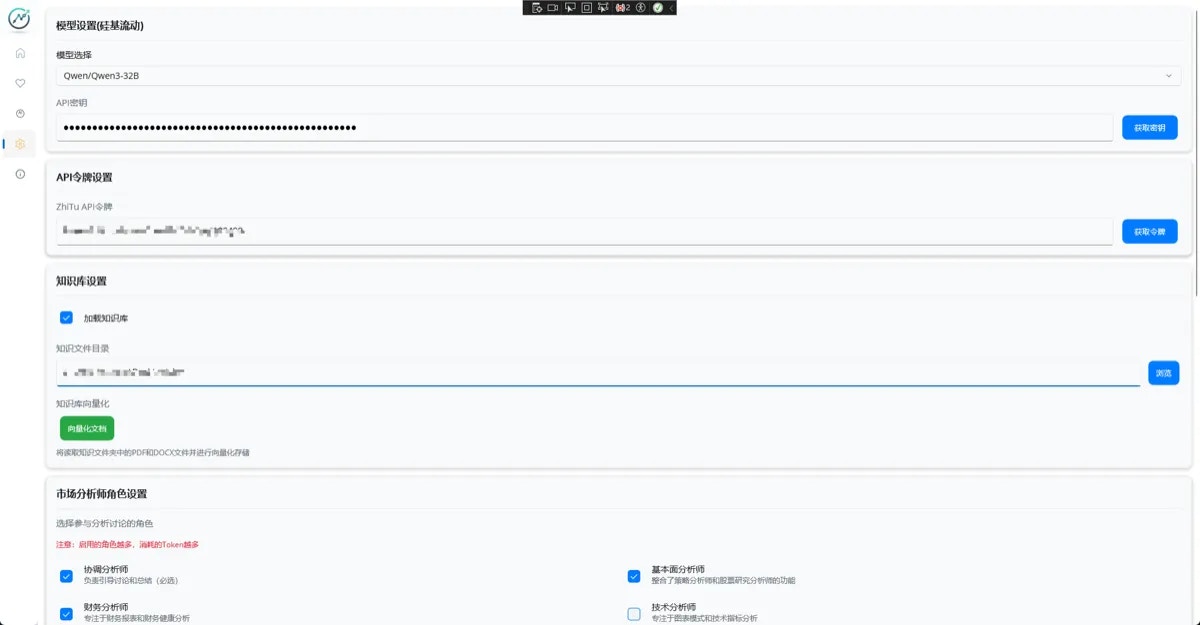
### Step 2: Configure in MarketAssistant
1. Open the MarketAssistant application
2. Navigate to the **Settings** page
3. In the **AI Model Configuration** section, fill in the following:
* **API Key**: Paste your SiliconFlow API Key
* **Model Selection**: Choose a suitable model from the dropdown (see recommendations below)
* **Embedding Model**: Keep default as `BAAI/bge-m3`
4. If stock data is required, obtain a token from ZhiTu website
5. Click **Save**
 ***
### Step 3: Verify the Configuration
1. After saving, try running a stock analysis
2. If it runs successfully, the setup is correct
3. If issues occur, check the application logs
***
## Model Selection Guide
### Recommended Combinations
| Use Case | Recommended Model | Features | Suitable For |
| -------------------------- | ------------------------------- | ------------------------------- | --------------------- |
| **Daily Use** | `Qwen/Qwen3-32B` | Fast response, low cost | Individual Investors |
| **Professional Analysis** | `deepseek-ai/DeepSeek-R1` | Strong reasoning, deep analysis | Professional Analysts |
| **Long Document Handling** | `Tongyi-Zhiwen/QwenLong-L1-32B` | Long context support | Report Analysis |
| **Complex Strategies** | `Qwen/Qwen3-235B-A22B` | Exceptional comprehension | Quantitative Traders |
### Full Supported Model List
* `Qwen/Qwen3-32B` – Qwen 32B version
* `deepseek-ai/DeepSeek-R1` – DeepSeek inference model
* `deepseek-ai/DeepSeek-V3` – DeepSeek V3 version
* `Qwen/Qwen3-235B-A22B` – Ultra-large scale model
* `Tongyi-Zhiwen/QwenLong-L1-32B` – Long-context language model
* `THUDM/GLM-4-32B-0414` – GLM-4 model by Tsinghua
* `THUDM/GLM-Z1-Rumination-32B-0414` – Deep reasoning model
* `tencent/Hunyuan-A13B-Instruct` – Tencent Hunyuan model
* `moonshotai/Kimi-K2-Instruct-0905` – Kimi K2 model
***
## Best Security Practices
### API Key Safety
**Recommendations**:
* API keys are stored locally only
* Rotate API keys regularly
### Data Privacy
* Stock analysis data is processed locally
* Only analysis requests are sent to SiliconFlow
* Vectorized documents are stored in a local SQLite database
***
## Optimization Tips
1. **Model Tuning**: Adjust model selection based on actual usage results
2. **Batch Processing**: Take advantage of batch features like AI-based stock screening
3. **Role Adjustment**: Customize analyst roles according to your usage patterns
***
## Technical Support
### Getting Help
* **MarketAssistant Issues**: Refer to the Issues section on the project’s GitHub page
* **Community Discussion**: Join discussions in relevant technical communities
### Reporting Issues
If you encounter technical problems, please provide the following information:
1. MarketAssistant version
2. The SiliconFlow model you used
3. Error messages and logs
4. Steps to reproduce the issue
***
### Step 3: Verify the Configuration
1. After saving, try running a stock analysis
2. If it runs successfully, the setup is correct
3. If issues occur, check the application logs
***
## Model Selection Guide
### Recommended Combinations
| Use Case | Recommended Model | Features | Suitable For |
| -------------------------- | ------------------------------- | ------------------------------- | --------------------- |
| **Daily Use** | `Qwen/Qwen3-32B` | Fast response, low cost | Individual Investors |
| **Professional Analysis** | `deepseek-ai/DeepSeek-R1` | Strong reasoning, deep analysis | Professional Analysts |
| **Long Document Handling** | `Tongyi-Zhiwen/QwenLong-L1-32B` | Long context support | Report Analysis |
| **Complex Strategies** | `Qwen/Qwen3-235B-A22B` | Exceptional comprehension | Quantitative Traders |
### Full Supported Model List
* `Qwen/Qwen3-32B` – Qwen 32B version
* `deepseek-ai/DeepSeek-R1` – DeepSeek inference model
* `deepseek-ai/DeepSeek-V3` – DeepSeek V3 version
* `Qwen/Qwen3-235B-A22B` – Ultra-large scale model
* `Tongyi-Zhiwen/QwenLong-L1-32B` – Long-context language model
* `THUDM/GLM-4-32B-0414` – GLM-4 model by Tsinghua
* `THUDM/GLM-Z1-Rumination-32B-0414` – Deep reasoning model
* `tencent/Hunyuan-A13B-Instruct` – Tencent Hunyuan model
* `moonshotai/Kimi-K2-Instruct-0905` – Kimi K2 model
***
## Best Security Practices
### API Key Safety
**Recommendations**:
* API keys are stored locally only
* Rotate API keys regularly
### Data Privacy
* Stock analysis data is processed locally
* Only analysis requests are sent to SiliconFlow
* Vectorized documents are stored in a local SQLite database
***
## Optimization Tips
1. **Model Tuning**: Adjust model selection based on actual usage results
2. **Batch Processing**: Take advantage of batch features like AI-based stock screening
3. **Role Adjustment**: Customize analyst roles according to your usage patterns
***
## Technical Support
### Getting Help
* **MarketAssistant Issues**: Refer to the Issues section on the project’s GitHub page
* **Community Discussion**: Join discussions in relevant technical communities
### Reporting Issues
If you encounter technical problems, please provide the following information:
1. MarketAssistant version
2. The SiliconFlow model you used
3. Error messages and logs
4. Steps to reproduce the issue