> ## Documentation Index
> Fetch the complete documentation index at: https://docs.siliconflow.cn/llms.txt
> Use this file to discover all available pages before exploring further.
# Juggle
> Updated: June 13, 2025
## 1. About Juggle
[Juggle](https://juggle.plus) is a powerful orchestration tool platform combining no-code, low-code, and AI capabilities for microservice orchestration & system integration. It provides solutions for pain points such as microservice interface orchestration, third-party system integration, private customization of standard products, and data cleansing. It supports interface orchestration for protocols like HTTP, Dubbo, and WebService, enhances workflows with scripting languages like Groovy, JavaScript, Python, and Java, and integrates with dozens of common data sources such as MySQL and Dameng. It empowers enterprise business systems to achieve win-win collaboration.
**Project Features:**
* Fully no-code workflow building, easy to get started
* Fully private deployment, ensuring data security
* Pursuit of extreme performance, handling high concurrency effortlessly
Open-source project address: [GitHub](https://github.com/somta/Juggle)
## 2. Using Juggle
Visit the [Juggle official website](https://juggle.plus) to download the latest version of Juggle, and refer to the [Juggle Installation Guide](https://juggle.plus/docs/guide/start/quick-start/) for setup and usage instructions.
## 3. Using SiliconFlow in Juggle
### a. Obtain an API Key
Open the SiliconFlow [official website](https://cloud.siliconflow.cn/) and register an account (or log in if already registered). After registration, go to the [API Keys](https://cloud.siliconflow.cn/account/ak) page, create a new API Key, and click to copy it for later use.
### b. Install the SiliconFlow Suite
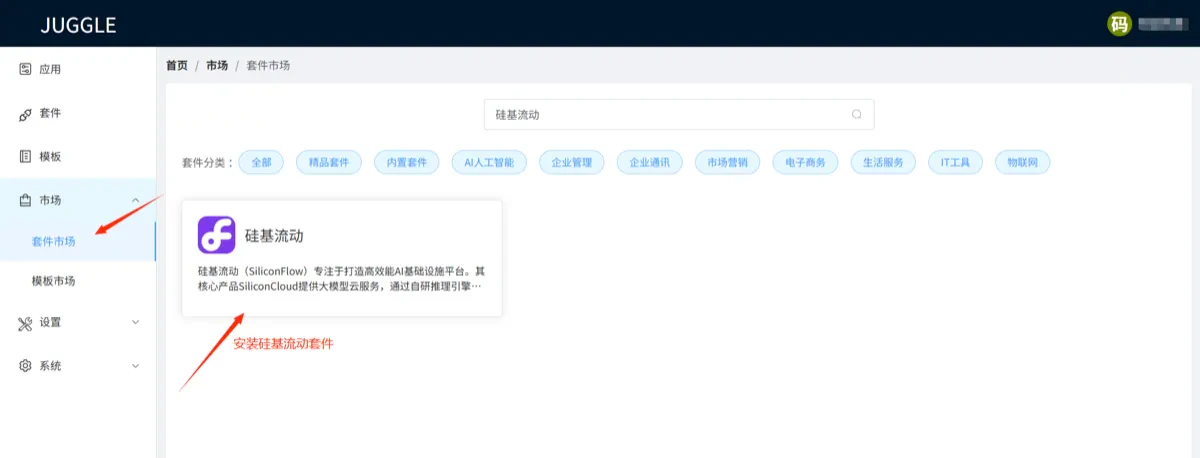
Navigate to the Juggle Suite Marketplace, search for **SiliconFlow**, and install the SiliconFlow suite. This will enable the use of SiliconFlow-provided interfaces in your workflows.
 ### c. Use SiliconFlow Interfaces
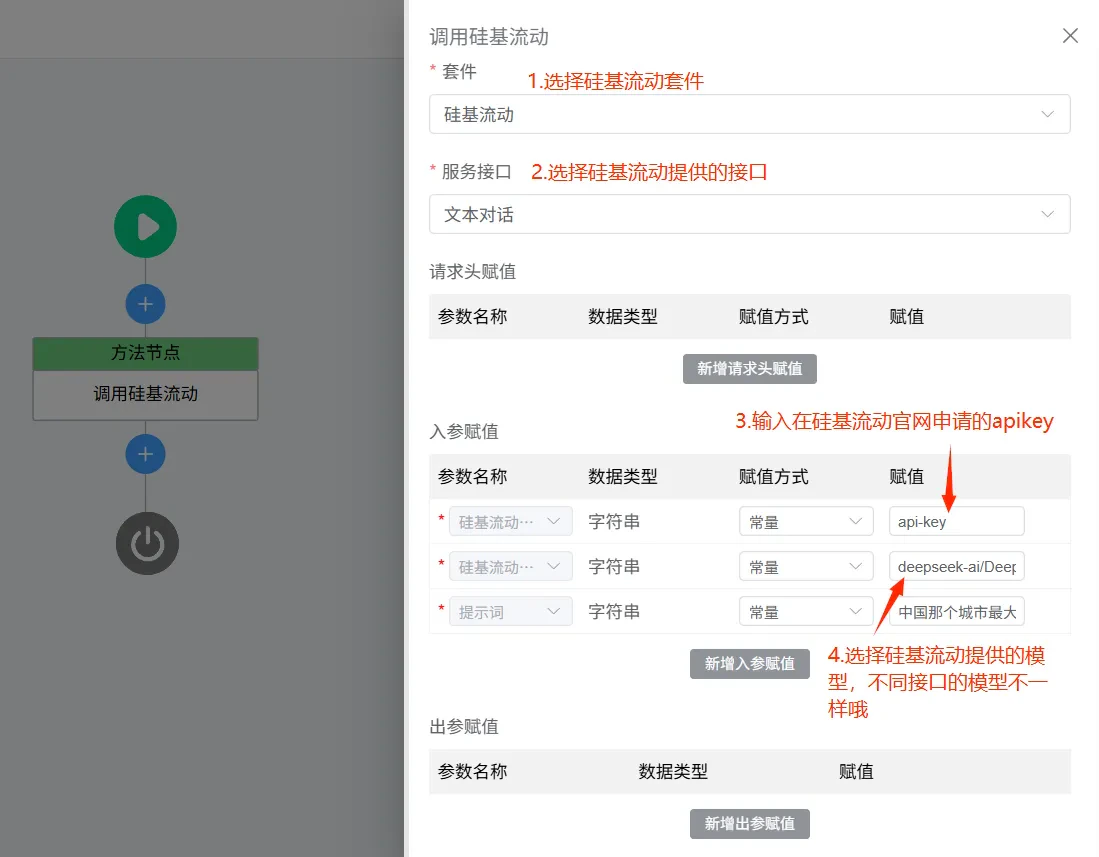
Create a **Method Node** in your workflow. In the node settings, select the **SiliconFlow Suite** to access interfaces such as text chat, image generation, video generation, and more. Leveraging these capabilities, users can orchestrate workflows for various scenarios to meet diverse needs.
### c. Use SiliconFlow Interfaces
Create a **Method Node** in your workflow. In the node settings, select the **SiliconFlow Suite** to access interfaces such as text chat, image generation, video generation, and more. Leveraging these capabilities, users can orchestrate workflows for various scenarios to meet diverse needs.