> ## Documentation Index
> Fetch the complete documentation index at: https://docs.siliconflow.cn/llms.txt
> Use this file to discover all available pages before exploring further.
# ValueCell
> Updated: November 27, 2025
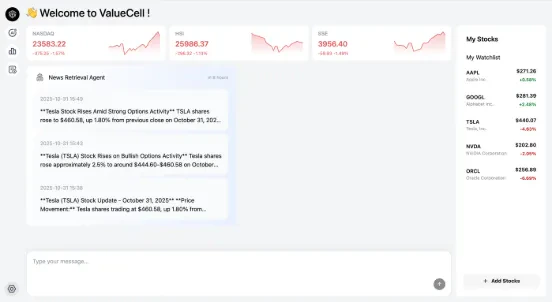
[ValueCell](https://valuecell.ai/) is a community-driven multi-agent financial application, building the world’s largest decentralized community of financial agents. It provides you with top-tier investment agent teams to help you with stock selection, research, monitoring, and trading.
 ## 1. Install ValueCell
* [Official download](https://valuecell.ai/)
* [Open-source release](https://github.com/ValueCell-ai/valuecell/releases)
ValueCell supports major operating systems such as Windows and macOS. Just download the installer and start a one-click installation to use it.
## 1. Install ValueCell
* [Official download](https://valuecell.ai/)
* [Open-source release](https://github.com/ValueCell-ai/valuecell/releases)
ValueCell supports major operating systems such as Windows and macOS. Just download the installer and start a one-click installation to use it.
 ## 2. Use SiliconFlow Models in ValueCell
### 2.1 Get a SiliconFlow API Key
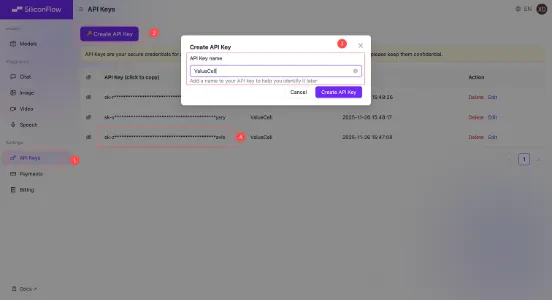
1. Log in to [SiliconFlow](https://siliconflow.cn/) (if you haven’t registered before, your first login will automatically create an account).
2. Go to the “API Keys” page in the console.
3. Click “Create Key” and set a name for the API Key (e.g., `ValueCell`).
4. Copy the generated key string. Please keep it in a safe place.
## 2. Use SiliconFlow Models in ValueCell
### 2.1 Get a SiliconFlow API Key
1. Log in to [SiliconFlow](https://siliconflow.cn/) (if you haven’t registered before, your first login will automatically create an account).
2. Go to the “API Keys” page in the console.
3. Click “Create Key” and set a name for the API Key (e.g., `ValueCell`).
4. Copy the generated key string. Please keep it in a safe place.
 ### 2.2 Configure It in ValueCell
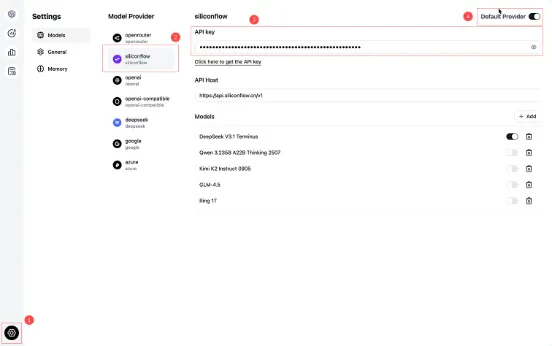
1. Open [ValueCell](https://valuecell.ai/) and go to the Settings Center.
2. In the list of model providers, select **SiliconFlow**.
3. Enter your personal SiliconFlow API key.
4. Set it as the default model provider and model for later use.
### 2.2 Configure It in ValueCell
1. Open [ValueCell](https://valuecell.ai/) and go to the Settings Center.
2. In the list of model providers, select **SiliconFlow**.
3. Enter your personal SiliconFlow API key.
4. Set it as the default model provider and model for later use.
 ## 3. Start Using ValueCell
### 3.1 Research & Analysis
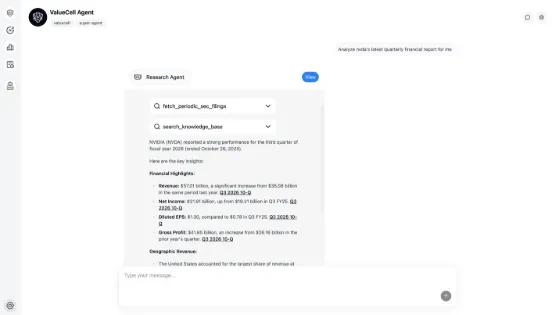
Based on authoritative data such as SEC filings, you can conduct in-depth financial research and multi-round dialogue, and quickly generate professional research reports.
## 3. Start Using ValueCell
### 3.1 Research & Analysis
Based on authoritative data such as SEC filings, you can conduct in-depth financial research and multi-round dialogue, and quickly generate professional research reports.
 ### 3.2 AI Automated Trading
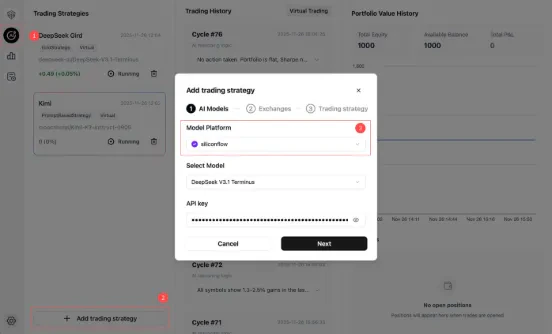
1. Go to the Auto Trading page and click Create Strategy.
2. Choose SiliconFlow as the model provider, select a model, and enter the strategy prompt and other information.
3. The AI will start automatically executing the trading strategy.
### 3.2 AI Automated Trading
1. Go to the Auto Trading page and click Create Strategy.
2. Choose SiliconFlow as the model provider, select a model, and enter the strategy prompt and other information.
3. The AI will start automatically executing the trading strategy.
 ### 3.3 Personalized News Push
Supports personalized scheduled news delivery, helping you stay on top of key information in time.
### 3.3 Personalized News Push
Supports personalized scheduled news delivery, helping you stay on top of key information in time.