> ## Documentation Index
> Fetch the complete documentation index at: https://docs.siliconflow.cn/llms.txt
> Use this file to discover all available pages before exploring further.
# Other Issues
## 1. Model Output Encoding Issues
Currently, some models are prone to encoding issues when parameters are not set. In such cases, you can try setting the parameters such as `temperature`, `top_k`, `top_p`, and `frequency_penalty`.
Modify the payload as follows, adjusting as needed for different languages:
```python theme={null}
payload = {
"model": "Qwen/Qwen2.5-Math-72B-Instruct",
"messages": [
{
"role": "user",
"content": "1+1=?",
}
],
"max_tokens": 200, # 按需添加
"temperature": 0.7, # 按需添加
"top_k": 50, # 按需添加
"top_p": 0.7, # 按需添加
"frequency_penalty": 0 # 按需添加
}
```
## 2.Explanation of max\_tokens
The max\_tokens is equal to the context length. Since some model inference services are still being updated, please do not set max\_tokens to the maximum value (context length) when making a request. It is recommended to reserve around 10k as space for input content.
## 3.Explanation of context\_length
The context\_length varies for different LLM models. You can search for the specific model on the [Models](https://cloud.siliconflow.cn/models) to view the model details.
## 4. What Are the Differences Between Pro and Non-Pro Models
1. For some models, the platform provides both a free version and a paid version. The free version is named as is, while the paid version is prefixed with "Pro/" to distinguish it. The free version has fixed Rate Limits, whereas the paid version has variable Rate Limits. For specific rules, please refer to: [Rate Limits](https://docs.siliconflow.cn/cn/userguide/rate-limits/rate-limit-and-upgradation).
2. For the `DeepSeek R1` and `DeepSeek V3` models, the platform distinguishes and names them based on the payment method. The Pro version only supports payment with recharged balance, while the non-Pro version supports payment with both granted balance and recharged balance.
## 5. Are There Any Time and Quality Requirements for Custom Voice Samples in the Voice Models
* For cosyvoice2, the custom voice sample must be less than 30 seconds.
To ensure the quality of the generated voice, it is recommended that users upload a voice sample that is 8 to 10 seconds long, with clear pronunciation and no background noise or interference.
## 6. Output Truncation Issues in Model Inference
Here are several aspects to troubleshoot the issue:
* When encountering output truncation through API requests:
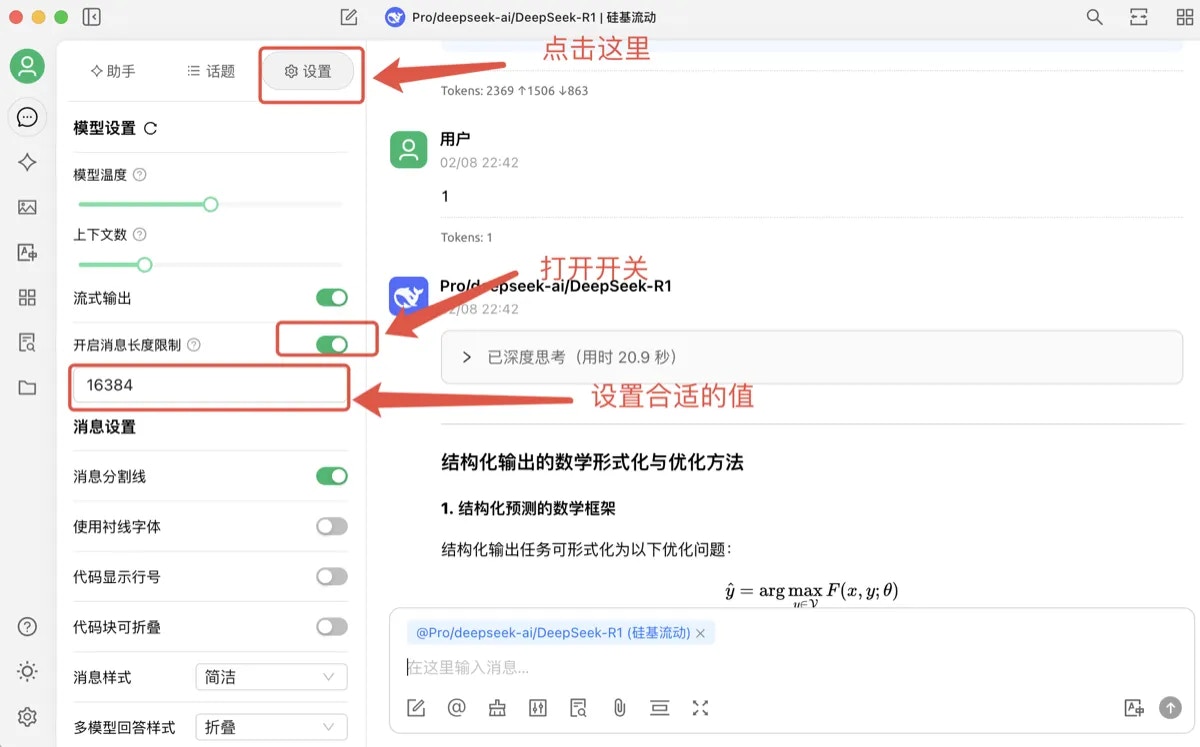
* Max Tokens Setting: Set the max\_token to an appropriate value. If the output exceeds the max\_token, it will be truncated. For the deepseek R1 series, the max\_token can be set up to 16,384.
* Stream Request Setting: In non-stream requests, long output content is prone to 504 timeout issues.
* Client Timeout Setting: Increase the client timeout to prevent truncation before the output is fully completed.
* When encountering output truncation through third-party client requests:
* CherryStdio has a default max\_tokens of 4,096. Users can enable the "Enable Message Length Limit" switch to set the max\_token to an appropriate value.
 ## 7. Troubleshooting 429 Error During Model Usage
Here are some areas to check for the issue:
* General Users: Verify your user tier and the corresponding Rate Limits (rate limits) for the model. If the request exceeds the Rate Limits, consider retrying after some time.
* Dedicated Instance Users: Dedicated instances typically do not have Rate Limits. If a 429 error occurs, first confirm whether the correct model name for the dedicated instance is being called, and check if the api\_key used matches the dedicated instance.
## 8. Account Balance Insufficient Despite Successful Recharge
Here are some areas to check for the issue:
* Ensure the api\_key being used matches the account that was just recharged.
* If the api\_key is correct, there may be a network delay during the recharge process. Consider waiting a few minutes and then retry.
## 9. Unable to Access Certain Models Despite Completing Real-name Verification
Here are some areas to check for the issue:
* Confirm that the api\_key being used matches the account that completed real-name verification.
* If the api\_key is correct, visit the Real-name Verification page to check the verification status. If the status shows "Verification in Progress," you can try canceling and re-verifying.
## 10. Issues with fnlp/MOSS-TTSD-v0.5
* The model tends to produce errors when the input text is too short
* When using this model for dialogue synthesis, the input text format should be as follows:
* \[S1]Indicates Speaker 1 is speaking.\[S2]Indicates Speaker 2 is speaking.
If you encounter other issues, please click on the [SiliconFlow MaaS Online Requirement Collection Form](https://siliconflow.feishu.cn/share/base/form/shrcnDiK9EIkGN3sK0PepqN1Ppb?hide_subject_id=1\&hide_passport_id=1\&hide_phone=1\&hide_email=1) to provide feedback.
## 7. Troubleshooting 429 Error During Model Usage
Here are some areas to check for the issue:
* General Users: Verify your user tier and the corresponding Rate Limits (rate limits) for the model. If the request exceeds the Rate Limits, consider retrying after some time.
* Dedicated Instance Users: Dedicated instances typically do not have Rate Limits. If a 429 error occurs, first confirm whether the correct model name for the dedicated instance is being called, and check if the api\_key used matches the dedicated instance.
## 8. Account Balance Insufficient Despite Successful Recharge
Here are some areas to check for the issue:
* Ensure the api\_key being used matches the account that was just recharged.
* If the api\_key is correct, there may be a network delay during the recharge process. Consider waiting a few minutes and then retry.
## 9. Unable to Access Certain Models Despite Completing Real-name Verification
Here are some areas to check for the issue:
* Confirm that the api\_key being used matches the account that completed real-name verification.
* If the api\_key is correct, visit the Real-name Verification page to check the verification status. If the status shows "Verification in Progress," you can try canceling and re-verifying.
## 10. Issues with fnlp/MOSS-TTSD-v0.5
* The model tends to produce errors when the input text is too short
* When using this model for dialogue synthesis, the input text format should be as follows:
* \[S1]Indicates Speaker 1 is speaking.\[S2]Indicates Speaker 2 is speaking.
If you encounter other issues, please click on the [SiliconFlow MaaS Online Requirement Collection Form](https://siliconflow.feishu.cn/share/base/form/shrcnDiK9EIkGN3sK0PepqN1Ppb?hide_subject_id=1\&hide_passport_id=1\&hide_phone=1\&hide_email=1) to provide feedback.