> ## Documentation Index
> Fetch the complete documentation index at: https://docs.siliconflow.cn/llms.txt
> Use this file to discover all available pages before exploring further.
# 在编程工具中使用本文档
SiliconFlow 文档站支持 [llms.txt 协议](https://llmstxt.org/),既可供用户直接查阅,也可无缝对接各类支持该协议的工具进行使用。
考虑到部分用户可能对 [llms.txt 协议](https://llmstxt.org/) 不够熟悉,下面将简要介绍使用流程及相关概述。
## 1. 在 Cursor 中使用本文档
### 1.1 在 Cursor 中增加 SiliconFlow 模型
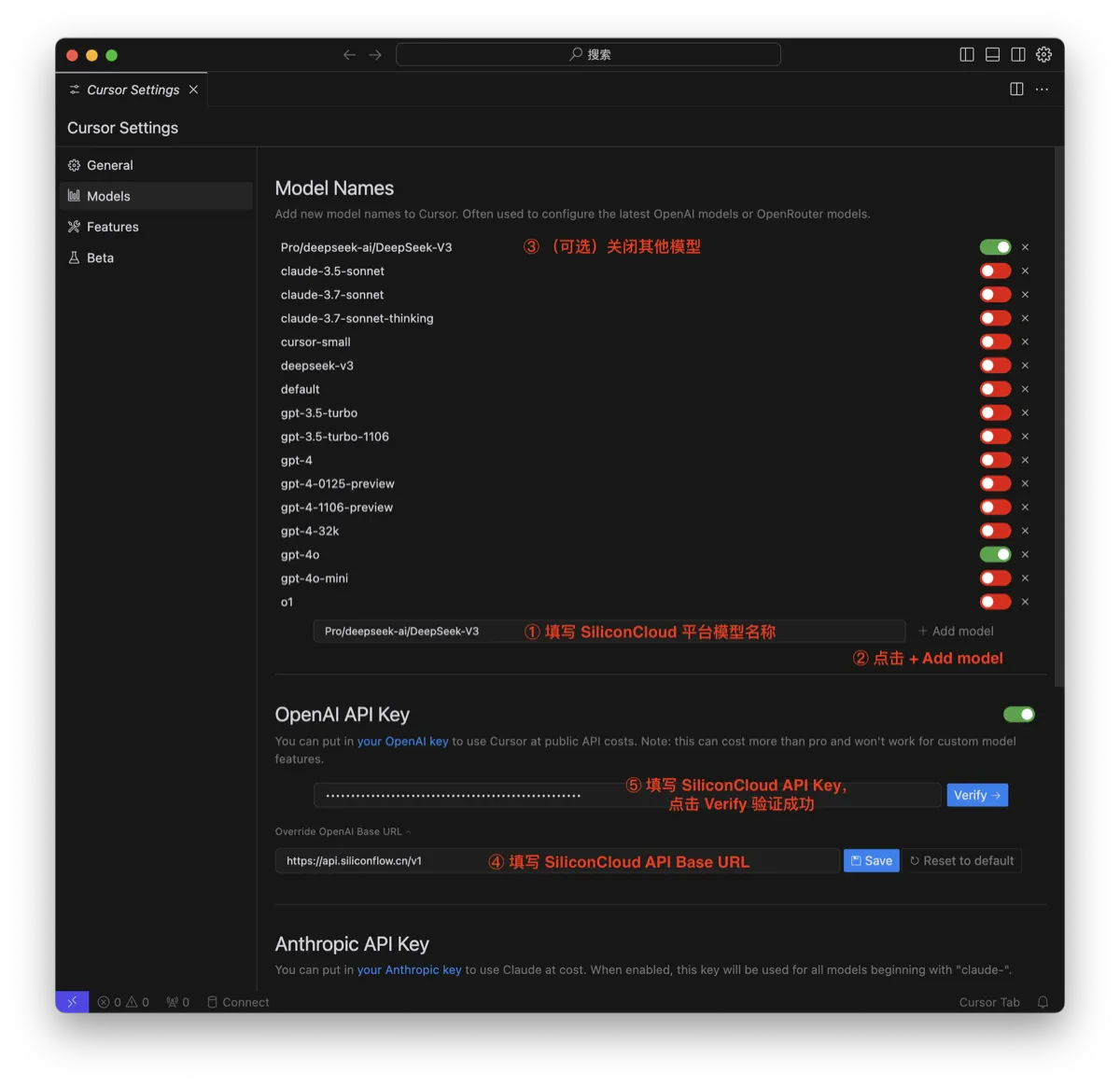
* 进入 Cursor 设置的 Models 页面,在 Models Names 列表底部输入框填写 SiliconFlow 平台的模型名称,点击`Add model`添加模型;
* 在 Models Names 列表中打开刚刚填入的模型开关;
* 在 OpenAI API Key 中 填写 SiliconFlow API Base URL 和 SiliconFlow API Key,点击 Verify 验证成功。
 ### 1.2 在 Cursor 中配置 SiliconFlow 文档
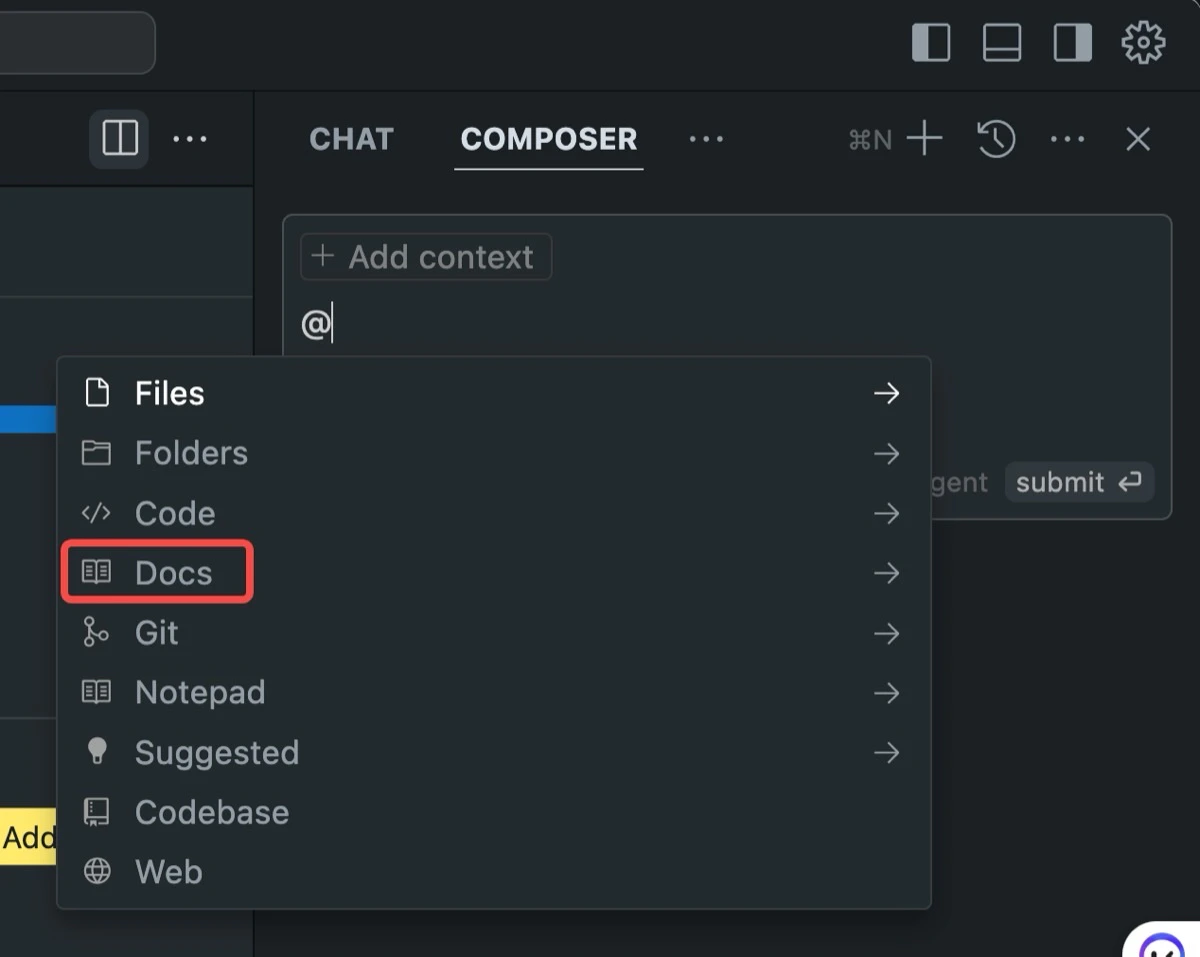
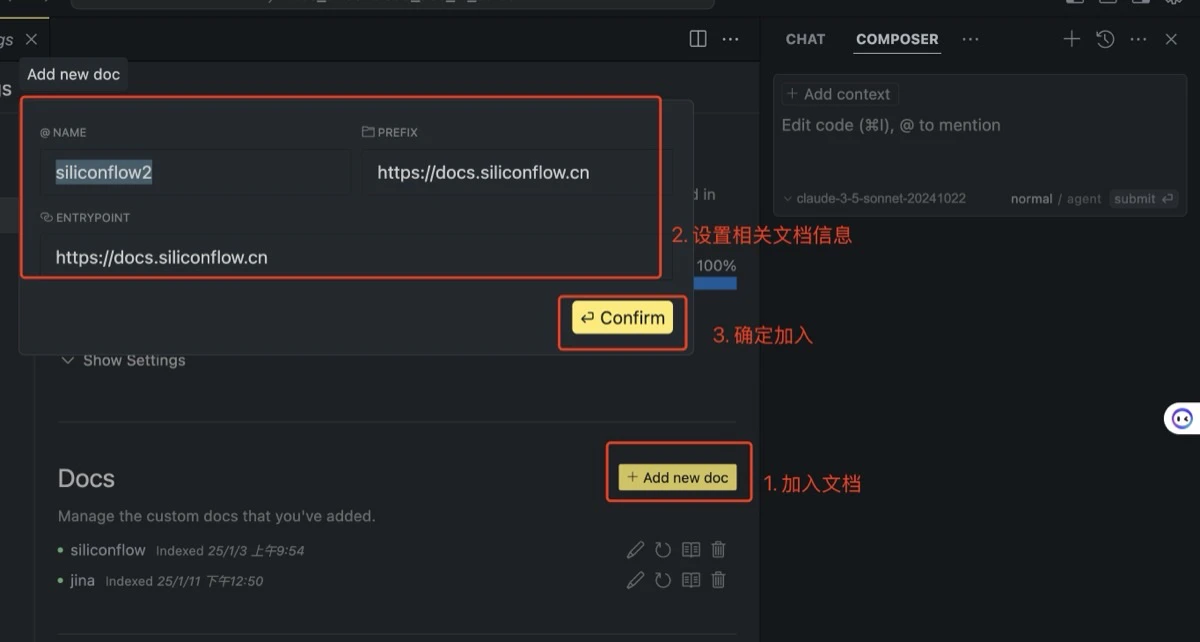
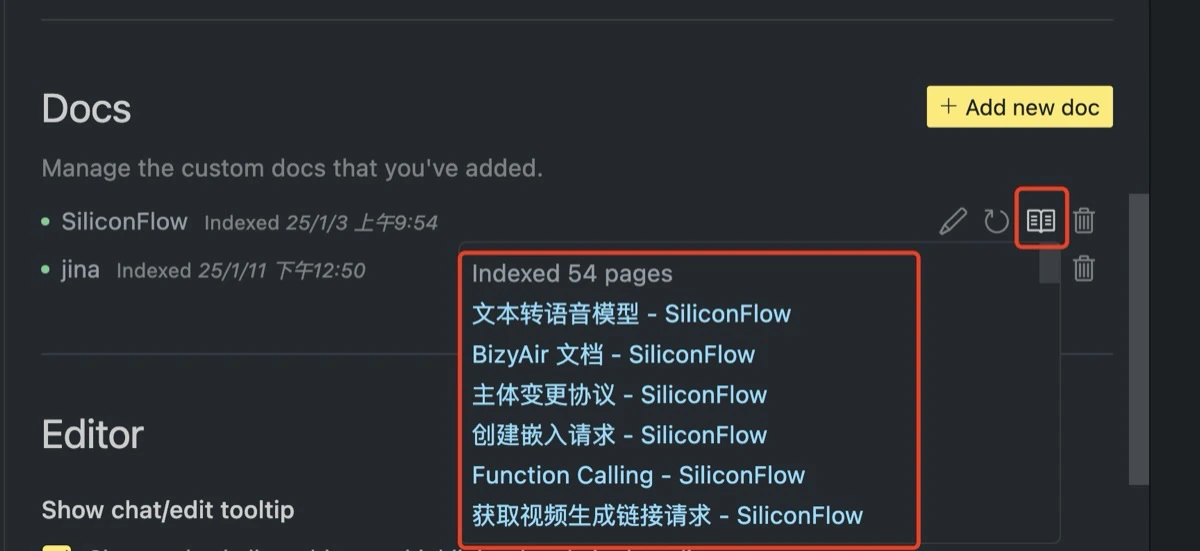
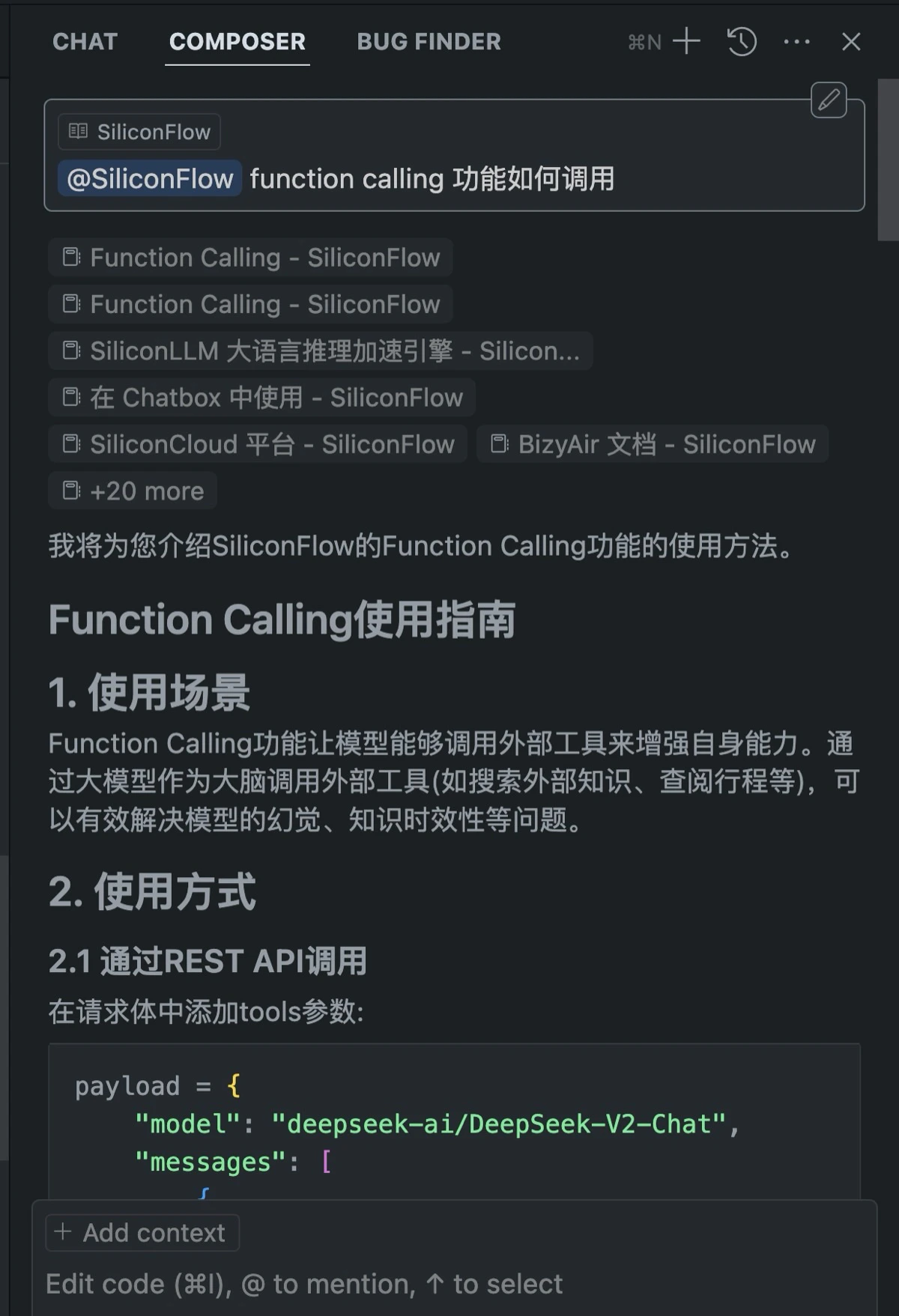
配置 `Cursor` 的 `@Docs` 数据源,可以很方便的将本文档丢给 `Cursor` 使用。
### 1.2 在 Cursor 中配置 SiliconFlow 文档
配置 `Cursor` 的 `@Docs` 数据源,可以很方便的将本文档丢给 `Cursor` 使用。
 ### 1.3 在 Cursor 中使用文档
 ## 2. 关于 llms.txt 的相关介绍
### 2.1 协议背景
llms.txt 是一种新兴的 Web 标准,旨在帮助大型语言模型(LLMs)更有效地访问和理解网站内容。通过在网站根目录下创建 llms.txt 文件,网站所有者可以为 AI 系统提供清晰的导航和指引,从而提升信息检索的效率。
### 2.2 文件结构:
llms.txt 文件采用 Markdown 格式,通常包含以下部分:
1. 标题:网站名称或项目名称。
2. 描述(可选):对网站或项目的简要介绍。
3. 详细信息(可选):提供更多背景信息或链接到其他文档。
4. 章节:列出网站的重要部分,每个部分包含链接和可选的详细说明。
示例如下(参考:[https://docs.siliconflow.cn/llms.txt](https://docs.siliconflow.cn/llms.txt) 和 [https://docs.siliconflow.cn/llms-full.txt](https://docs.siliconflow.cn/llms-full.txt) 文件)
```markdown theme={null}
# SiliconFlow
## Docs
- [创建语音转文本请求](https://docs.siliconflow.cn/api-reference/audio/create-audio-transcriptions): Creates an audio transcription.
- [创建文本转语音请求](https://docs.siliconflow.cn/api-reference/audio/create-speech): 从输入文本生成音频。根据输入的文本生成音频。接口生成的数据为音频的二进制数据,需要使用者自行处理。参考:https://docs.siliconflow.cn/capabilities/text-to-speech#5
- [删除参考音频](https://docs.siliconflow.cn/api-reference/audio/delete-voice): 删除用户预置音色
- [上传参考音频](https://docs.siliconflow.cn/api-reference/audio/upload-voice): 上传用户预置音色,支持以 base64 编码或者文件形式上传,参考https://docs.siliconflow.cn/capabilities/text-to-speech#2-2)
- [参考音频列表获取](https://docs.siliconflow.cn/api-reference/audio/voice-list): 获取用户预置音色列表
...
```
### 2.3 文件作用
#### 2.3.1 /llms.txt:
* 大规模人工智能友好导航:该文件提供了整个文档导航的简化视图,使 Cursor 或 ChatGPT 等 LLM 可以更轻松地索引您的内容。
* 将其视为人工智能的搜索引擎优化--用户现在可以直接通过通用的 LLM 找到特定产品的信息。
#### 2.3.2 /llms-full.txt:
* 文件会将所有文档文本编译成一个标记符文件,便于人工智能工具基于该文件将信息直接载入其上下文窗口。
* 可以将文档输入到 Cursor 等人工智能编码助手中,让它们根据您产品的具体细节提供上下文感知建议。
### 2.4 与现有标准的区别:
虽然 llms.txt 与 robots.txt 和 sitemap.xml 等现有标准在功能上有所重叠,但它们的目的和作用不同:
* robots.txt:用于指示搜索引擎爬虫哪些页面可以或不可以抓取,主要关注访问权限控制。
* sitemap.xml:提供网站的结构地图,帮助搜索引擎了解网站的页面布局,主要用于索引目的。
* llms.txt:为大型语言模型提供结构化的内容概述,帮助 AI 系统更好地理解和处理网站信息,提升与 AI 交互的效果。
## 3. 在其他工具中使用
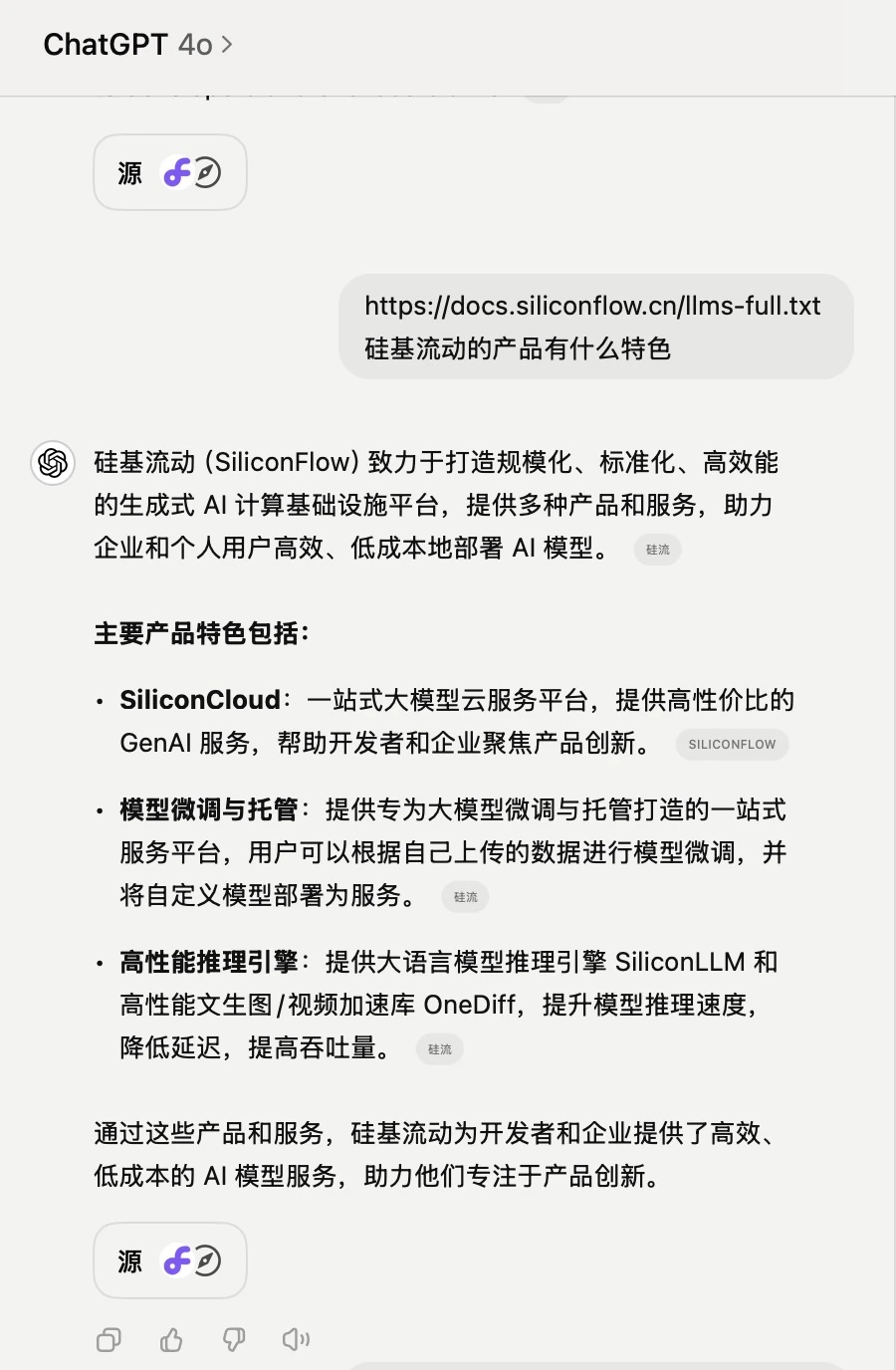
其他平台如果支持[llms.txt 协议](https://llmstxt.org/),也可以直接使用。
比如在 ChatGPT 中使用:
## 2. 关于 llms.txt 的相关介绍
### 2.1 协议背景
llms.txt 是一种新兴的 Web 标准,旨在帮助大型语言模型(LLMs)更有效地访问和理解网站内容。通过在网站根目录下创建 llms.txt 文件,网站所有者可以为 AI 系统提供清晰的导航和指引,从而提升信息检索的效率。
### 2.2 文件结构:
llms.txt 文件采用 Markdown 格式,通常包含以下部分:
1. 标题:网站名称或项目名称。
2. 描述(可选):对网站或项目的简要介绍。
3. 详细信息(可选):提供更多背景信息或链接到其他文档。
4. 章节:列出网站的重要部分,每个部分包含链接和可选的详细说明。
示例如下(参考:[https://docs.siliconflow.cn/llms.txt](https://docs.siliconflow.cn/llms.txt) 和 [https://docs.siliconflow.cn/llms-full.txt](https://docs.siliconflow.cn/llms-full.txt) 文件)
```markdown theme={null}
# SiliconFlow
## Docs
- [创建语音转文本请求](https://docs.siliconflow.cn/api-reference/audio/create-audio-transcriptions): Creates an audio transcription.
- [创建文本转语音请求](https://docs.siliconflow.cn/api-reference/audio/create-speech): 从输入文本生成音频。根据输入的文本生成音频。接口生成的数据为音频的二进制数据,需要使用者自行处理。参考:https://docs.siliconflow.cn/capabilities/text-to-speech#5
- [删除参考音频](https://docs.siliconflow.cn/api-reference/audio/delete-voice): 删除用户预置音色
- [上传参考音频](https://docs.siliconflow.cn/api-reference/audio/upload-voice): 上传用户预置音色,支持以 base64 编码或者文件形式上传,参考https://docs.siliconflow.cn/capabilities/text-to-speech#2-2)
- [参考音频列表获取](https://docs.siliconflow.cn/api-reference/audio/voice-list): 获取用户预置音色列表
...
```
### 2.3 文件作用
#### 2.3.1 /llms.txt:
* 大规模人工智能友好导航:该文件提供了整个文档导航的简化视图,使 Cursor 或 ChatGPT 等 LLM 可以更轻松地索引您的内容。
* 将其视为人工智能的搜索引擎优化--用户现在可以直接通过通用的 LLM 找到特定产品的信息。
#### 2.3.2 /llms-full.txt:
* 文件会将所有文档文本编译成一个标记符文件,便于人工智能工具基于该文件将信息直接载入其上下文窗口。
* 可以将文档输入到 Cursor 等人工智能编码助手中,让它们根据您产品的具体细节提供上下文感知建议。
### 2.4 与现有标准的区别:
虽然 llms.txt 与 robots.txt 和 sitemap.xml 等现有标准在功能上有所重叠,但它们的目的和作用不同:
* robots.txt:用于指示搜索引擎爬虫哪些页面可以或不可以抓取,主要关注访问权限控制。
* sitemap.xml:提供网站的结构地图,帮助搜索引擎了解网站的页面布局,主要用于索引目的。
* llms.txt:为大型语言模型提供结构化的内容概述,帮助 AI 系统更好地理解和处理网站信息,提升与 AI 交互的效果。
## 3. 在其他工具中使用
其他平台如果支持[llms.txt 协议](https://llmstxt.org/),也可以直接使用。
比如在 ChatGPT 中使用:
 ## 4. 扩展阅读
1. The /llms.txt file, [https://llmstxt.org/](https://llmstxt.org/)
2. @Docs, [https://docs.cursor.com/context/@-symbols/@-docs](https://docs.cursor.com/context/@-symbols/@-docs)
3. LLMs.txt:AI时代的站点地图, [https://juejin.cn/post/7447083753187328050](https://juejin.cn/post/7447083753187328050)
## 4. 扩展阅读
1. The /llms.txt file, [https://llmstxt.org/](https://llmstxt.org/)
2. @Docs, [https://docs.cursor.com/context/@-symbols/@-docs](https://docs.cursor.com/context/@-symbols/@-docs)
3. LLMs.txt:AI时代的站点地图, [https://juejin.cn/post/7447083753187328050](https://juejin.cn/post/7447083753187328050)