> ## Documentation Index
> Fetch the complete documentation index at: https://docs.siliconflow.cn/llms.txt
> Use this file to discover all available pages before exploring further.
# Next AI Draw.io
> 更新日期:2025年12月30日
[Next AI Draw.io](https://github.com/DayuanJiang/next-ai-draw-io) 是一款 AI 驱动的图表创建工具,支持通过自然语言命令创建和修改 draw\.io 图表。只需输入文字描述,即可自动生成流程图、架构图、UML 图等各类专业图表。
## 使用方式
### 方式一:在线使用(推荐)
打开 [https://next-ai-drawio.jiang.jp/zh](https://next-ai-drawio.jiang.jp/zh),无需安装,直接在浏览器中使用。
### 方式二:下载桌面应用
#### 1. 下载安装包
访问 [Releases 页面](https://github.com/DayuanJiang/next-ai-draw-io/releases) 下载对应平台的安装包:
| 平台 | 下载文件 |
| ------- | ---------------------------------- |
| macOS | `.dmg` (Intel & Apple Silicon) |
| Windows | `.exe` 安装程序 (x64 & ARM64) |
| Linux | `.AppImage` 或 `.deb` (x64 & ARM64) |
#### 2. 安装并启动
* **macOS**:双击 `.dmg` 文件,将应用拖入 Applications 文件夹
* **Windows**:运行 `.exe` 安装程序
* **Linux**:运行 `.AppImage` 或使用 `dpkg -i xxx.deb` 安装
### 视频教程
使用视频教程: [点击此处](https://github.com/user-attachments/assets/9d60a3e8-4a1c-4b5e-acbb-26af2d3eabd1)
## 配置 AI
### 打开应用,进入设置页面
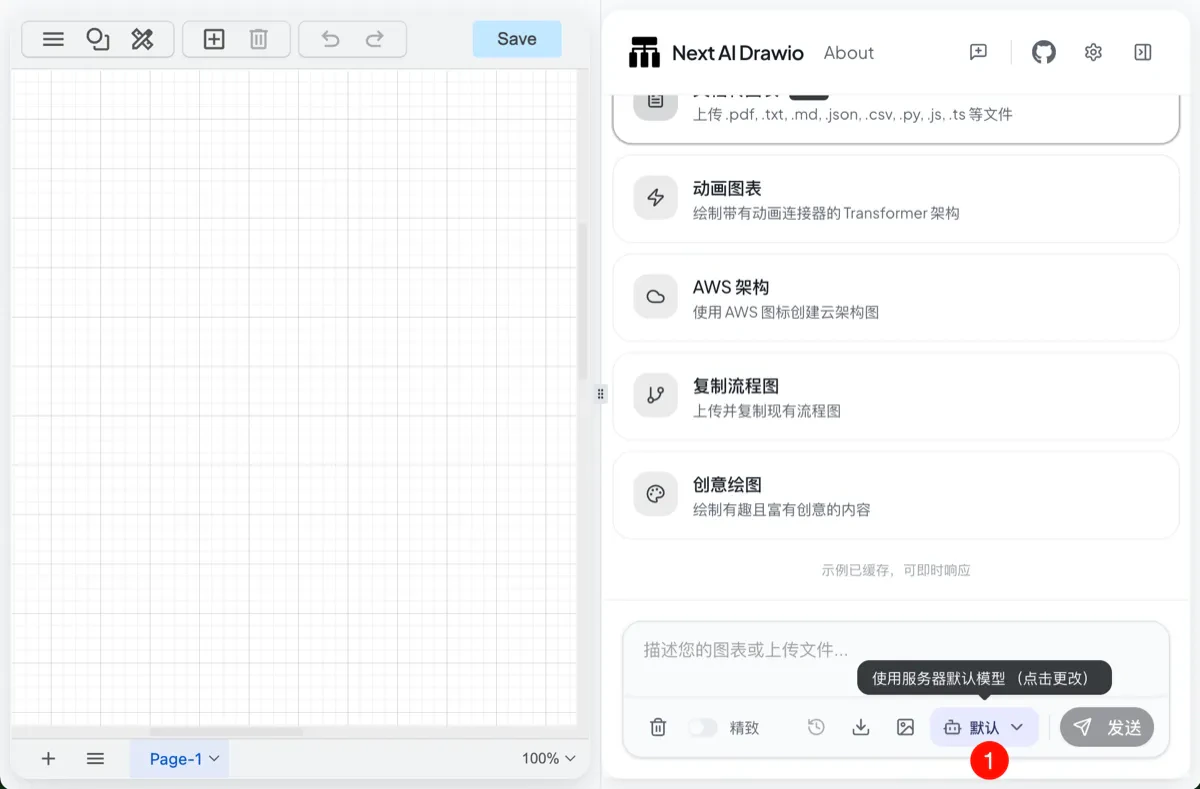 ### 选择 AI 供应商并输入 API Key
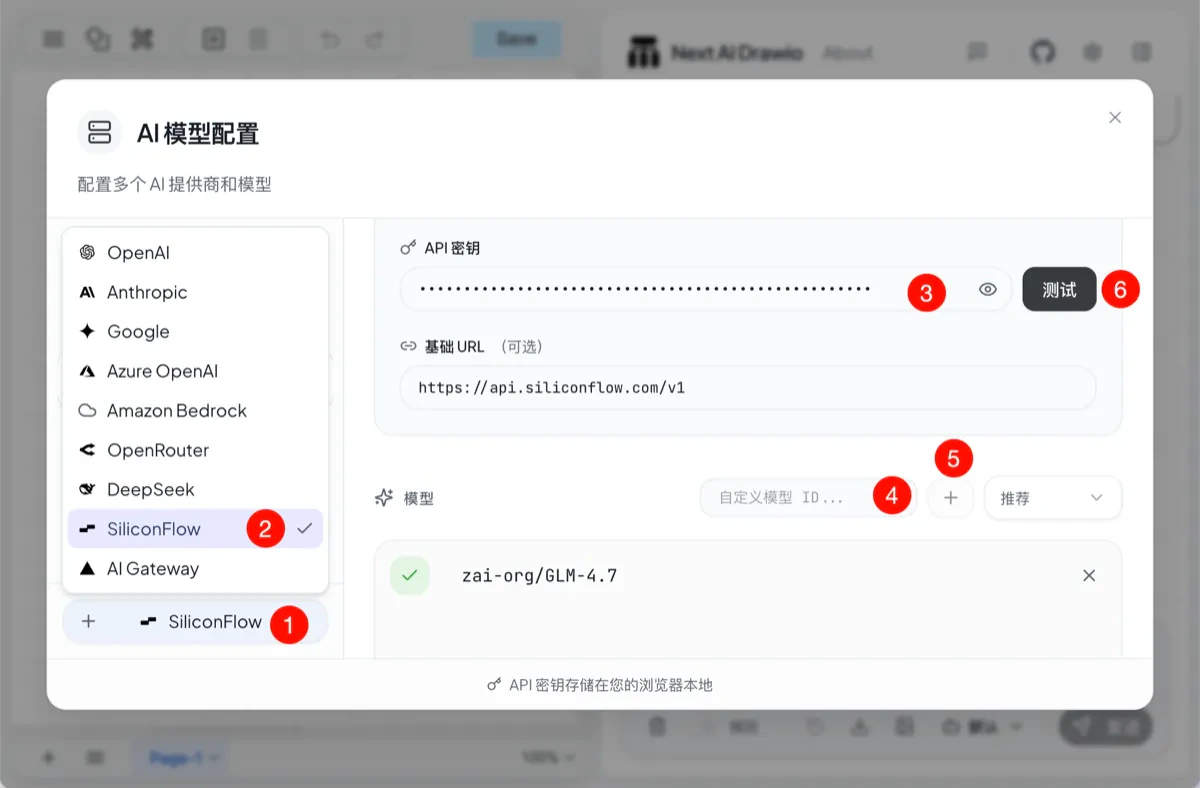 1. 点击添加模型按键
2. 选择 SiliconFlow(硅基流动)
3. 输入您的 API Key
4. 输入模型名称
5. 点击保存
6. 测试模型可用性
**当模型前面显示加号表示可以使用。**
## 常见问题
**Q: 为什么生成的图表质量不好?**
A: 图表生成需要强大的模型能力。请使用大型编程模型(如GLM-4.7、Minimax-M2等)以获得更好效果。
**Q: 支持生成哪些类型的图表?**
A: 支持流程图、架构图、UML 图、思维导图、云架构图(AWS/GCP/Azure)等所有 draw\.io 支持的图表类型。
## 相关链接
* [在线演示](https://next-ai-drawio.jiang.jp/)
* [GitHub 仓库](https://github.com/DayuanJiang/next-ai-draw-io)
1. 点击添加模型按键
2. 选择 SiliconFlow(硅基流动)
3. 输入您的 API Key
4. 输入模型名称
5. 点击保存
6. 测试模型可用性
**当模型前面显示加号表示可以使用。**
## 常见问题
**Q: 为什么生成的图表质量不好?**
A: 图表生成需要强大的模型能力。请使用大型编程模型(如GLM-4.7、Minimax-M2等)以获得更好效果。
**Q: 支持生成哪些类型的图表?**
A: 支持流程图、架构图、UML 图、思维导图、云架构图(AWS/GCP/Azure)等所有 draw\.io 支持的图表类型。
## 相关链接
* [在线演示](https://next-ai-drawio.jiang.jp/)
* [GitHub 仓库](https://github.com/DayuanJiang/next-ai-draw-io)