> ## Documentation Index
> Fetch the complete documentation index at: https://docs.siliconflow.cn/llms.txt
> Use this file to discover all available pages before exploring further.
# LazyLLM
> 更新日期:2025年11月4日
LazyLLM 是由商汤 LazyAGI 团队开发的一款开源低代码大模型应用开发工具,提供从应用搭建、数据准备、模型部署、微调到评测的一站式工具支持,以极低的成本快速构建 AI 应用,持续迭代优化效果。
## API 申请和环境配置
### 1. 账号注册
* 注册硅基流动账号。[点击注册](https://cloud.siliconflow.cn/i/TR9Ym0c4)
* 进入控制台,[获取 API key](https://cloud.siliconflow.cn/account/ak)。
### 2. 环境配置
参考网页:[快速开始 - LazyLLM](https://docs.lazyllm.ai/zh-cn/stable/)
## API 使用测试
### 0. 设置环境变量
可以使用以下命令设置对应的环境变量。或从代码中显示给入:
```
export LAZYLLM_SILICONFLOW_API_KEY=<申请到的api key>
```
### 1. 实现对话和图片识别
#### 文本问答演示
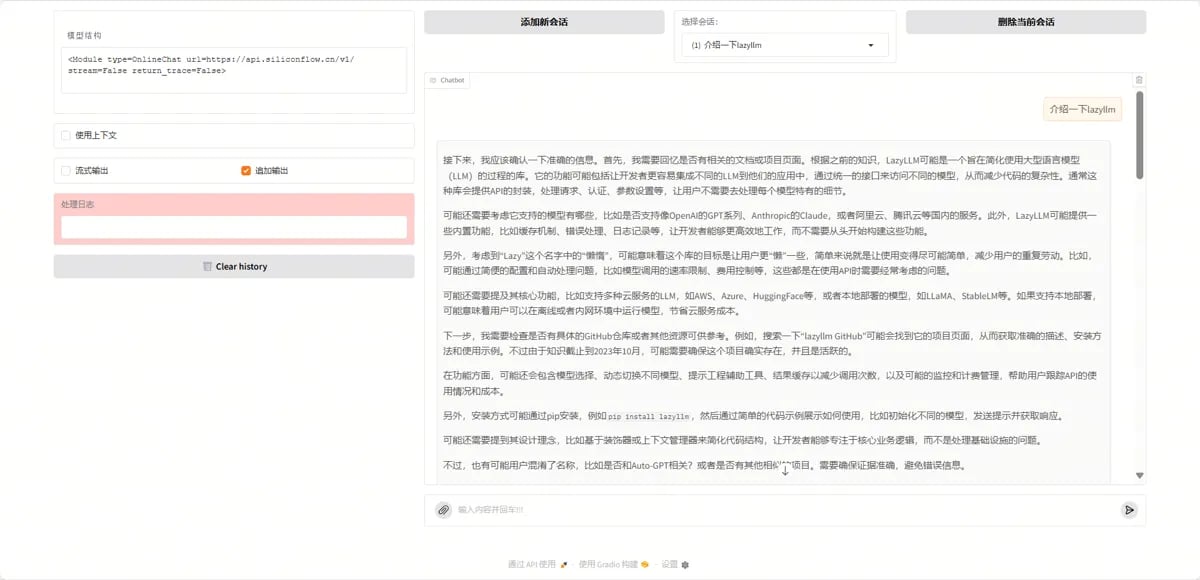
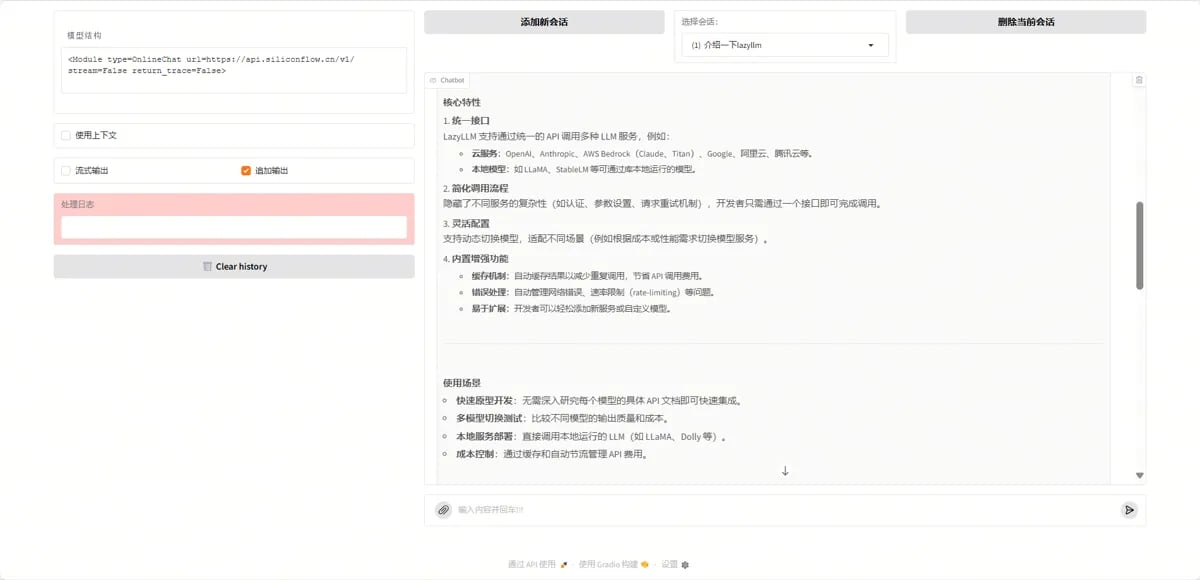
填好 api\_key 后,运行下面代码可以迅速调用模型并生成一个问答形式的前端界面:
```
import lazyllm
from lazyllm import OnlineChatModule,WebModule
api_key = 'sk-' #替换成申请的api
# # 测试chat模块
llm = OnlineChatModule(source='siliconflow', api_key=api_key, stream=False)
w = WebModule(llm, port=8846, title="siliconflow")
w.start().wait()
```
我们询问“什么是 LazyLLM ”,运行结果如下:
 #### 多模态问答演示
在输入中通过 lazyllm\_files 参数传入一张图片,并询问图片的内容,就可以实现多模态的问答。
```
import lazyllm
from lazyllm import OnlineChatModule
api_key = 'sk-' #替换成申请的api
llm = OnlineChatModule(source='siliconflow', api_key=api_key,
model='Qwen/Qwen2.5-VL-72B-Instruct')
print(llm('你好,这是什么?', lazyllm_files=['your_picture.png']))
```
这里我们使用这个图片测试多模态问答
#### 多模态问答演示
在输入中通过 lazyllm\_files 参数传入一张图片,并询问图片的内容,就可以实现多模态的问答。
```
import lazyllm
from lazyllm import OnlineChatModule
api_key = 'sk-' #替换成申请的api
llm = OnlineChatModule(source='siliconflow', api_key=api_key,
model='Qwen/Qwen2.5-VL-72B-Instruct')
print(llm('你好,这是什么?', lazyllm_files=['your_picture.png']))
```
这里我们使用这个图片测试多模态问答
 命令行中输出结果:
 ### 2. 实现文生图和文生语音
使用`OnlineMultiModalModule`进行文生图和文生语音,运行后会输出生成的文件路径
```
import lazyllm
from lazyllm import OnlineMultiModalModule
api_key = 'sk-xxx'
# 测试文生图 fuction=text2image
llm =OnlineMultiModalModule(source='siliconflow',api_key=api_key,function='text2image')
print(llm("生成一个可爱的小狗"))
#测试文生语音 function=tts
llm = OnlineMultiModalModule(source='siliconflow',api_key=api_key,function='tts')
print(llm("你好,你叫什么名字",voice='fnlp/MOSS-TTSD-v0.5:anna'))
```
运行结果:
### 2. 实现文生图和文生语音
使用`OnlineMultiModalModule`进行文生图和文生语音,运行后会输出生成的文件路径
```
import lazyllm
from lazyllm import OnlineMultiModalModule
api_key = 'sk-xxx'
# 测试文生图 fuction=text2image
llm =OnlineMultiModalModule(source='siliconflow',api_key=api_key,function='text2image')
print(llm("生成一个可爱的小狗"))
#测试文生语音 function=tts
llm = OnlineMultiModalModule(source='siliconflow',api_key=api_key,function='tts')
print(llm("你好,你叫什么名字",voice='fnlp/MOSS-TTSD-v0.5:anna'))
```
运行结果:
 生成的语音如下:
| [tmpck44zfds.mp3](https://ones.ainewera.com/wiki/?/team/JNwe8qUX/share/7fy5a6mk/page/FUcz8wKs/) | 55.13 KB | 2025-10-27 23:13 |
| ----------------------------------------------------------------------------------------------- | -------- | ---------------- |
### 3. 10+行代码实现知识库问答
#### 实现 Eembed 和 Rerank 功能
运行下面代码,使用`OnlineEmbeddingModule`进行向量化嵌入;设置`type='rerank'`调用重排序模型。
```
import lazyllm
from lazyllm import OnlineEmbeddingModule
api_key = 'sk-'
#测试embed模块
llm = OnlineEmbeddingModule(source='siliconflow', api_key=api_key)
print(llm("苹果"))
#测试rerank模块
llm = OnlineEmbeddingModule(source='siliconflow', api_key=api_key, type='rerank')
print(llm(["苹果", ['苹果','香蕉','橘子']]))
```
向量化的结果如下:
```
[-0.0024823144, -0.0075530247, -0.013154144, -0.031351723, -0.024489744, 0.009692847, 0.008086464, -0.037946977, 0.013251133, -0.046675995, -0.011390155, -0.011111312, 0.016779112, 0.054168403, 0.04849454, 0.014742341, 0.02341074, -0.015542501, 0.059939254, -0.024223024, 0.0065467632, -0.041244607, -0.022925794, -0.024804957, 0.006752865, -0.047548898, -0.03685585, 0.0513557....,-0.070656545, -0.01997975, 0.023398615, 0.008735079]
```
词相似性分数如下:
```
[{'index': 0, 'relevance_score': 0.9946065545082092}, {'index': 2, 'relevance_score': 0.014802767895162106}, {'index': 1, 'relevance_score': 0.0004139931406825781}]
```
#### 知识库导入
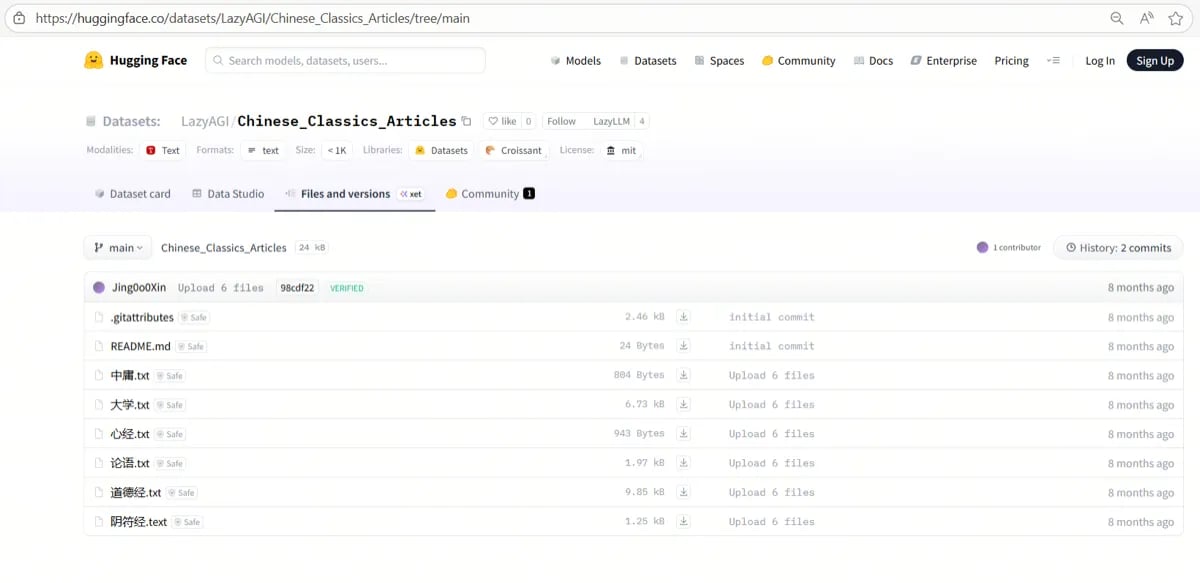
我们使用中国古典文籍作为示例知识库,下载后放在 database 文件夹。示例数据集下载链接:[示例数据集下载](https://huggingface.co/datasets/LazyAGI/Chinese_Classics_Articles/tree/main)
生成的语音如下:
| [tmpck44zfds.mp3](https://ones.ainewera.com/wiki/?/team/JNwe8qUX/share/7fy5a6mk/page/FUcz8wKs/) | 55.13 KB | 2025-10-27 23:13 |
| ----------------------------------------------------------------------------------------------- | -------- | ---------------- |
### 3. 10+行代码实现知识库问答
#### 实现 Eembed 和 Rerank 功能
运行下面代码,使用`OnlineEmbeddingModule`进行向量化嵌入;设置`type='rerank'`调用重排序模型。
```
import lazyllm
from lazyllm import OnlineEmbeddingModule
api_key = 'sk-'
#测试embed模块
llm = OnlineEmbeddingModule(source='siliconflow', api_key=api_key)
print(llm("苹果"))
#测试rerank模块
llm = OnlineEmbeddingModule(source='siliconflow', api_key=api_key, type='rerank')
print(llm(["苹果", ['苹果','香蕉','橘子']]))
```
向量化的结果如下:
```
[-0.0024823144, -0.0075530247, -0.013154144, -0.031351723, -0.024489744, 0.009692847, 0.008086464, -0.037946977, 0.013251133, -0.046675995, -0.011390155, -0.011111312, 0.016779112, 0.054168403, 0.04849454, 0.014742341, 0.02341074, -0.015542501, 0.059939254, -0.024223024, 0.0065467632, -0.041244607, -0.022925794, -0.024804957, 0.006752865, -0.047548898, -0.03685585, 0.0513557....,-0.070656545, -0.01997975, 0.023398615, 0.008735079]
```
词相似性分数如下:
```
[{'index': 0, 'relevance_score': 0.9946065545082092}, {'index': 2, 'relevance_score': 0.014802767895162106}, {'index': 1, 'relevance_score': 0.0004139931406825781}]
```
#### 知识库导入
我们使用中国古典文籍作为示例知识库,下载后放在 database 文件夹。示例数据集下载链接:[示例数据集下载](https://huggingface.co/datasets/LazyAGI/Chinese_Classics_Articles/tree/main)
 首先定义 embed 模型,然后使用 LazyLLM 的 Document 组件创建文档管理模块,以实现知识库的导入。
```
import lazyllm
api_key='sk-'
embed_model = lazyllm.OnlineEmbeddingModule(source="siliconflow", api_key=api_key)
documents = lazyllm.Document(
dataset_path = "database",
embed = embed_model
)
```
#### 知识库检索
现在有了外部知识库,LazyLLM 中使用 Retriever 组件可以实现检索知识库并召回相关内容。
使用示例:
```
import lazyllm
from lazyllm.tools import Retriever, Document, SentenceSplitter
api_key='sk-'
embed_model = lazyllm.OnlineEmbeddingModule(source="siliconflow", api_key=api_key)
documents = Document(dataset_path='database', embed=embed_model, manager=False)
rm = Retriever(documents, group_name='CoarseChunk', similarity='bm25', similarity_cut_off=0.01, topk=6)
rm.start()
print(rm("user query"))
```
#### 知识库问答
结合上述模型、文档管理和检索模块,搭配 LazyLLM 内置的 Flow 组件进行完整的数据流搭建,完整代码如下:
```
import lazyllm
from lazyllm import (
OnlineEmbeddingModule, OnlineChatModule, Document, SentenceSplitter,
Retriever, Reranker, ChatPrompter, pipeline
)
# 初始化api key和提示词
api_key = 'sk-'
prompt = """
You will play the role of an AI Q&A assistant and complete a dialogue task.
In this task, you need to provide your answer based on the given context and question.
"""
# 初始化模型
embed_model = OnlineEmbeddingModule(source="siliconflow", api_key=api_key)
rerank_model = OnlineEmbeddingModule(source="siliconflow", api_key=api_key, type="rerank")
llm = OnlineChatModule(source="siliconflow", api_key=api_key)
# 定义文档管理模块,并创建节点组
doc = Document(dataset_path="/home/xxx/database", manager=False, embed=embed_model)
doc.create_node_group(name="block", transform=SentenceSplitter, chunk_size=1024, chunk_overlap=100)
doc.create_node_group(name="line", transform=SentenceSplitter, chunk_size=128, chunk_overlap=20, parent="block")
# 构建RAG pipeline(多路召回--重排--提示词拼接--大模型回答)
with pipeline() as ppl:
with lazyllm.parallel().sum as ppl.prl:
prl.r1 = Retriever(doc, group_name='line', similarity="cosine", topk=6, target='block')
prl.r2 = Retriever(doc, group_name='block', similarity="cosine", topk=6)
ppl.reranker = Reranker('ModuleReranker', model=rerank_model, output_format='content',
join=True) | bind(query=ppl.input)
ppl.formatter = (lambda context, query: dict(context_str=str(context), query=query)) | bind(query=ppl.input)
ppl.llm = llm.prompt(lazyllm.ChatPrompter(prompt, extra_keys=["context_str"]))
ppl.start()
query = "何为天道"
print(ppl(query))
```
可以看到 RAG 很好地从《道德经》等中取回了有关天道的内容,并传给大模型进行回答。
首先定义 embed 模型,然后使用 LazyLLM 的 Document 组件创建文档管理模块,以实现知识库的导入。
```
import lazyllm
api_key='sk-'
embed_model = lazyllm.OnlineEmbeddingModule(source="siliconflow", api_key=api_key)
documents = lazyllm.Document(
dataset_path = "database",
embed = embed_model
)
```
#### 知识库检索
现在有了外部知识库,LazyLLM 中使用 Retriever 组件可以实现检索知识库并召回相关内容。
使用示例:
```
import lazyllm
from lazyllm.tools import Retriever, Document, SentenceSplitter
api_key='sk-'
embed_model = lazyllm.OnlineEmbeddingModule(source="siliconflow", api_key=api_key)
documents = Document(dataset_path='database', embed=embed_model, manager=False)
rm = Retriever(documents, group_name='CoarseChunk', similarity='bm25', similarity_cut_off=0.01, topk=6)
rm.start()
print(rm("user query"))
```
#### 知识库问答
结合上述模型、文档管理和检索模块,搭配 LazyLLM 内置的 Flow 组件进行完整的数据流搭建,完整代码如下:
```
import lazyllm
from lazyllm import (
OnlineEmbeddingModule, OnlineChatModule, Document, SentenceSplitter,
Retriever, Reranker, ChatPrompter, pipeline
)
# 初始化api key和提示词
api_key = 'sk-'
prompt = """
You will play the role of an AI Q&A assistant and complete a dialogue task.
In this task, you need to provide your answer based on the given context and question.
"""
# 初始化模型
embed_model = OnlineEmbeddingModule(source="siliconflow", api_key=api_key)
rerank_model = OnlineEmbeddingModule(source="siliconflow", api_key=api_key, type="rerank")
llm = OnlineChatModule(source="siliconflow", api_key=api_key)
# 定义文档管理模块,并创建节点组
doc = Document(dataset_path="/home/xxx/database", manager=False, embed=embed_model)
doc.create_node_group(name="block", transform=SentenceSplitter, chunk_size=1024, chunk_overlap=100)
doc.create_node_group(name="line", transform=SentenceSplitter, chunk_size=128, chunk_overlap=20, parent="block")
# 构建RAG pipeline(多路召回--重排--提示词拼接--大模型回答)
with pipeline() as ppl:
with lazyllm.parallel().sum as ppl.prl:
prl.r1 = Retriever(doc, group_name='line', similarity="cosine", topk=6, target='block')
prl.r2 = Retriever(doc, group_name='block', similarity="cosine", topk=6)
ppl.reranker = Reranker('ModuleReranker', model=rerank_model, output_format='content',
join=True) | bind(query=ppl.input)
ppl.formatter = (lambda context, query: dict(context_str=str(context), query=query)) | bind(query=ppl.input)
ppl.llm = llm.prompt(lazyllm.ChatPrompter(prompt, extra_keys=["context_str"]))
ppl.start()
query = "何为天道"
print(ppl(query))
```
可以看到 RAG 很好地从《道德经》等中取回了有关天道的内容,并传给大模型进行回答。